 NEWS
NEWS
Apple Launches ‘Reserve a Battery’ Option in Canada
 02/01/2018
 2457
2457
Apple had to make an important change to its battery replacement program in 2018, following the discovery that the company slows down older iPhones in an effort to preserve battery life and stop random shutdowns.
Launching a $29 battery replacement program for iPhone 6 units and newer handsets has forced a bit of a strain on Apple, especially as it relates to batteries for the iPhone 6 Plus. Replacing the battery in an older iPhone can fix any performance issues that might be creeping in, and, with the reduced price, it seems like the popular option for a lot of iPhone owners out there.
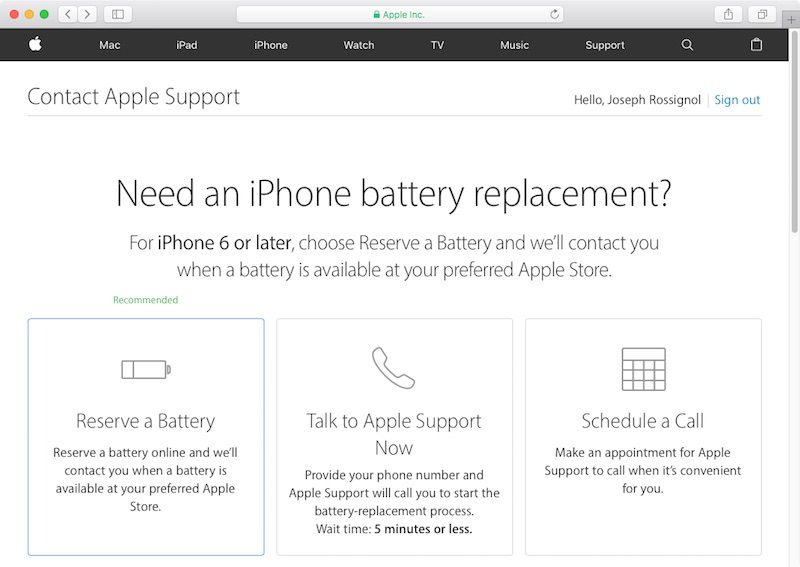
To help stem the tide of folks walking into Apple retail stores and requesting batteries, Apple has launched a new “Reserve a Battery” option. It is only available in Canada right now, as MacRumors discovered. With it, customers can reserve a battery for their iPhone model, and, within three to five days, Apple says that it will let the customer know when their battery is ready for them to pick up at their preferred Apple Store.
To do it, customers in Canada need to make sure they are signed in with their Apple ID, log into the official Support page, then select the Battery, Power, and Charging option, then Battery Replacement, and, finally Reserve a Battery.
Interestingly, the report indicates that Apple is using Canada as a trial market, which could mean that the company is considering launching the new feature in other markets at some point in the future. There is no guarantee of that, though, nor any indication which markets would be covered.
Our Take
It's good to see that Apple is trying to fix this situation as quickly as it can. Of course, the strain it now feels with trying to fulfill battery replacement orders is its own fault. Still, this should make it a bit easier for customers to get a battery, without having to be turned away at a store because they might not have a replacement ready.
Source: iPhonehacks









