 NEWS
NEWS
Siri Adds Tennis and Golf Data Integration Ahead of Australian Open
 01/11/2018
 2597
2597
Apple continued to build out its Siri virtual assistant this week with new data integrations for golf and tennis, additions seemingly timed to coincide with next Monday's start to the Australian Open.
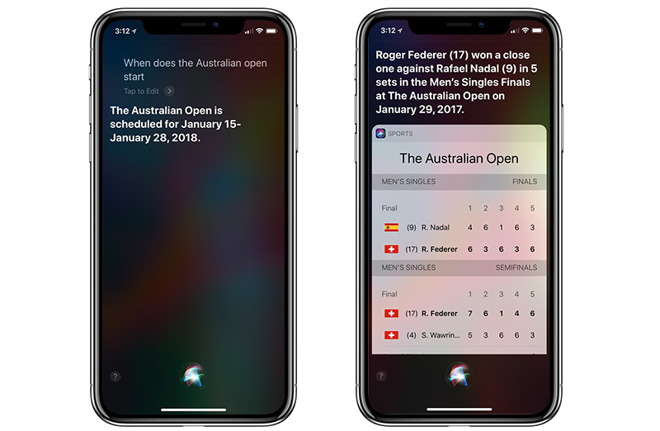
With the new integrations in place, users can query Siri about live tennis and golf scores, upcoming tournament schedules, player statistics, historical data and more.
For example, Siri now responds to commands like, "How did Roger Federer do at the Australian Open," and "Who is playing in the Australian Open today." As the tournament is currently moving through qualifying rounds, Siri does not yet have a response to the latter question.
Tennis data includes scores and statistics for Association of Tennis Professionals, Women's Tennis Association and Grand Slam matches dating back to 2016, while golf data covers major PGA and LPGA tours going back to 2007.
Prior to the recent update, Siri would direct users searching for tennis or golf information to the web or social media sites like Twitter.
Apple currently offers sports data to users in 26 countries, including major markets like the U.S., China, Germany, Italy, Japan and the UK. Alongside tennis and golf, Siri can answer user questions about baseball, basketball, American football, hockey and soccer.
Apple is continuously building out backend support for its virtual assistant technology, which will make its way into the home with HomePod later this year. Apple's first smart speaker is slated to debut in early 2018 Siri integration baked in, granting owners the ability to access Siri's database, play music and podcasts, control HomeKit devices and more.
Source: appleinsider









