 NEWS
NEWS
The iPhone 8 Outperforms the iPhone X in a Fast Wireless Charging Test
 01/05/2018
 2923
2923
All 2017 iPhones come with wireless charging support, a first for Apple’s iPhones. But Apple’s wireless charging isn’t as fast as Android. The iPhone X and iPhone 8 can use 5W and 7.5W chargers, which means charge times are still way slower than wired charging. Recent tests have shown that wired charging on the iPhone X is a lot faster than wireless charging, especially if you invest in USB-C chargers.
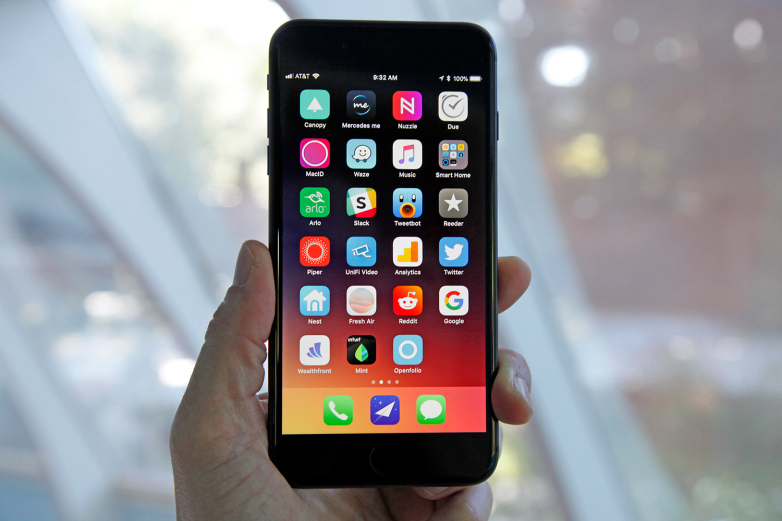
But which of the three 2017 iPhones does better in wireless charging tests? A new battery test explains.
Rather than measuring just the iPhone X’s wireless charging performance, which is what we saw in other tests, Tom’s Guide looked at all three iPhones that Apple released last year.
The results are on par with MacRumors’ findings for the iPhone X. 5W wireless chargers are the slowest option, while USB-C wired chargers are the fastest. The Lightning adapter in the iPhone’s box is faster or on par with the 7.5W wireless chargers in some cases as well.
The same conclusions are also true for the iPhone 8 and iPhone 8 Plus. Wireless charging is great, but it’s not faster than the Lightning adapter that comes with the iPhone. The most effective option remains the fast wired charging achieved with the help of a USB-C charger and USB-C-to-Lightning adapter.
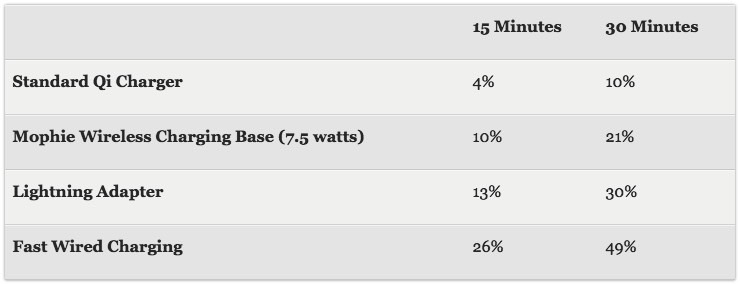
But the iPhone 8 is where fast wireless charging really seems to shine. Tom’s Guide found that a 7.5W charger would charge the iPhone 8 twice as fast compared to a standard 5W charger (image above). Let’s keep in mind that the three iPhones have different capacities, which explains why we see different recharge percentages for each device.
These conclusions aren’t unexpected. Wireless charging is a convenient way to top up the battery of the iPhone, but it’s not going to get you better results than wired charging. Even the default wired charging is usually faster than the fastest wireless charger that you can get for an iPhone. But if you own an iPhone 8 and want to experience wireless charging, it might be a good idea to go for 7.5W, as you’ll see significant gains. The full comparison is available at this link.
Source: bgr









