 NEWS
NEWS
Bizarre European Ruling allows Italian Designers to Use Steve Jobs Brand
 12/29/2017
 2537
2537
A truly bizarre EU ruling has allowed two Italian brothers to sell clothes and accessories under the Steve Jobs brand name, complete with a variation on the Apple logo …
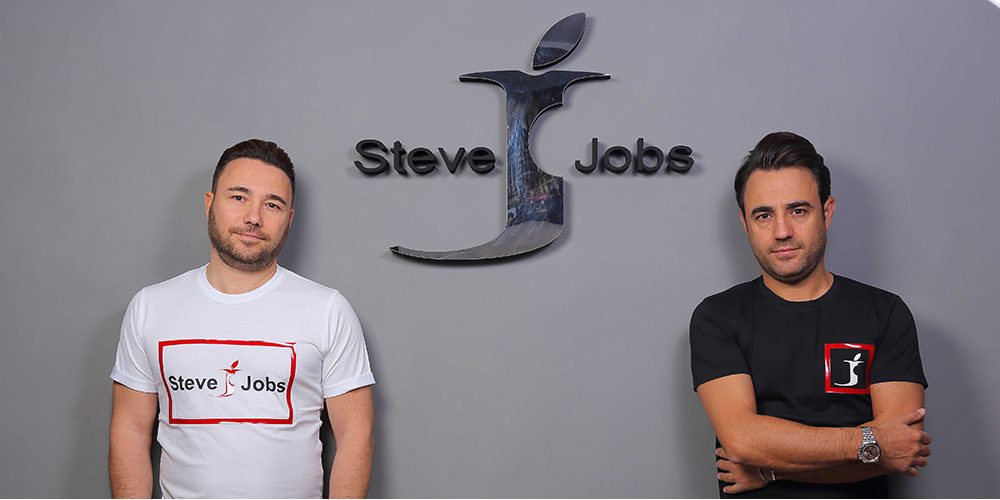
La Repubblica Napoli reports that Vincenzo and Giacomo Barbato first applied to register the Steve Jobs brand name, and logo with the Apple leaf and bite taken out of it, back in 2012.
The story begins in 2012 when the two Neapolitan entrepreneurs registered the brand ‘Steve Jobs’ with a logo comprising a large J with a bite taken out of it. “We did our market research – the two tell us – and we noticed that Apple, one of the best known companies in the world, never thought about registering its founder’s brand, so we decided to do it.”
Apple did, of course, challenge the branding, sending the brothers four huge folders of legal documents, but the EU’s Office for Harmonization in the Internal Market rejected Apple’s objection.
The opposition is rejected in its entirety.
The inexplicable decision apparently rested on the fact that Apple chose to focus on the bite from the letter J, arguing that this was clearly copying its own logo. That case failed, says the piece, because the EU ruled that a letter was not edible, therefore the missing piece could not be a bite mark.
It seems also that Apple had no claim on the Steve Jobs name, though I would have thought that his family does. However, for now, at least, the brothers are free to use both the name and the logo. They say that the EU ruling was first made in 2014, but they did not publicise the fact until they had registered the brand across the world.
Source: 9to5mac











