
NEWS

iPhone's Siri Wakes Up During Shakespeare Play in Britain

12/26/2017

2544

iPhone helper Siri interrupted a Shakespeare play when an actor delivered his words: “Sirrah, what news?”


The line from Julius Caesar sparked Apple’s virtual assistant into life. Siri interrupted a Shakespeare play when an actor delivered these words from Shakepeare's Julius Caesar.


The smartphone owner was left embarrassed as Siri asked actor Edward Stone, who was playing Cassius, to repeat the request.


A packed audience of 500 people heard the gaffe at Bristol’s Old Vic theatre.
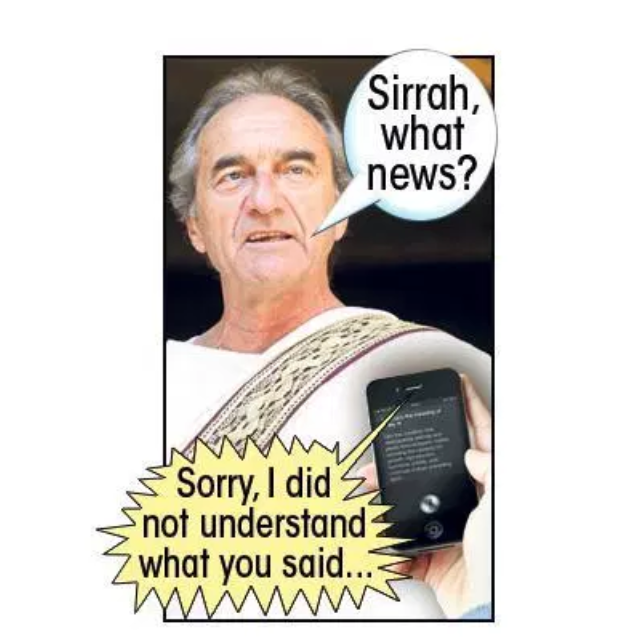

 iPhone's Siri Wakes Up During Shakespeare Play in Britain


It was one of theatre’s most amusing moments of 2017, featured in industry mag The Stage.


In another, funnyman Lenny Henry had to help an audience member who threw up at the Young Vic theatre in London.


And at One Love: The Bob Marley Musical at Birmingham Rep, a woman asked box office staff whether the dead star himself was performing.


An excited guide dog repeatedly replied to barking  sound effects with hilarious timing at Hull Truck Theatre.


And a visitor at the open-air Globe Theatre in London complained about having to stand in sunshine.


Convinced the roof was retractable, he moaned to staff: “It’s irresponsible not to have put the roof on.”


Source: thesun

Windows
Mac OS
iOS
Linux
3uTools
Win 64-bit For this device
V9.0 2025-11-11
Download
Win 32-bit For this device
V9.0 2025-11-11
Download
3uTools
Intel Chip How to Identify Chip Type
V9.0 2025-12-02
Download
Apple Silicon
V9.0 2025-12-02
Download
How to Identify Chip Type
1.  Click the Apple icon in the top-left corner of the screen and select About This Mac.
2.  Check the Processor or Chip field to determine if it is "Intel" or "Apple".
Please use the 3uTools PC client to install the iOS client:
1、 Install either the Windows or Mac version of 3uTools on your computer
2、 Open the PC client and connect your device to the computer via USB cable
3、 After the connection is successful, wait for the computer to automatically install the mobile app for the device, or locate “Install Mobile App” on the computer and manually click to install.
3uTools
deb file
V3.01 2025-11-20
Download
rpm file
V3.01 2025-11-20
Download
Windows
Windows
iOS
iOS
Android
Android
TV
TV
3uAirPlayer
Win 64-bit For this device
V6.0.2 2025-11-19
Download
Win 32-bit For this device
V6.0.2 2025-11-19
Download
iOS Device Mirroring (No App Required)
1、 Install 3uAirPlayer on the Windows PC
2、 Open Control Center and select Screen Mirroring
3、 From the list, choose your PC to start mirroring
4、 Or connect your iOS device to the PC via USB to begin mirroring
Scan to get "3uAirPlayer" App
3uAirPlayer TV V1.0.18
2025-11-28
TV System Requirements: Android 7.0 or later
Download the TV installation package, copy it to a USB drive, insert it into your TV or set-top box, then select the file from the home screen to install.




