NEWS

If You Delete Apple Pay Cash It's Complicated to Reinstall It

12/12/2017

2442

If You Delete Apple Pay Cash It's Complicated to Reinstall It


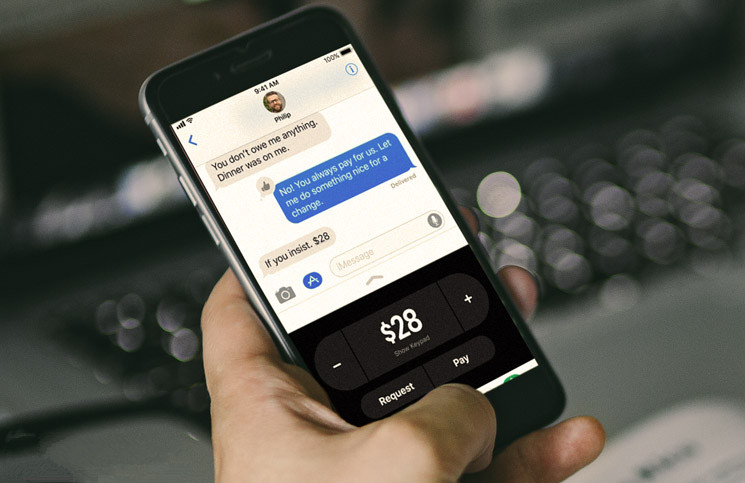
Last week with the launch of iOS 11.2, Apple officially launched Apple Pay Cash


When you update your phone to 11.2 the app will automatically be installed on your phone, which means it’s not in the App Store. Just like Apple’s other preinstalled apps, it’s also not meant to be removed from your phone, but a bug in the operating system appears to be allowing people to do so.


Removing the app isn’t a big deal unless you delete it, then later decide you want to use Apple Pay Cash.


In that scenario, if you’re out to dinner with friends and someone wants to pay you back using the service, you won’t be able to just reinstall it on your phone since it’s not in the App Store.


iDrop News originally reported that the only solution to the problem is to restore your phone to its factory settings, which isn’t exactly something you want to do, but we also discovered another solution:

1. Tap “More” in the far right of app drawer.
2. Tap “Edit” in upper right
3. You will then see Apple Pay appear in the “More Apps” section. Simply turn the switch on and the Apple Pay Cash reappears


The best plan of action is just to leave it on your phone and maybe throw it in a remote folder for safe keeping. Just because you don’t want to use it now doesn’t mean you won’t want to in the future.


Apple will likely correct the problem in iOS 11.3.


Source: lifehacker

Windows
Mac OS
iOS
Linux
3uTools
Win 64-bit For this device
V9.0 2025-11-11
Download
Win 32-bit For this device
V9.0 2025-11-11
Download
3uTools
Intel Chip How to Identify Chip Type
V9.0 2025-12-02
Download
Apple Chip
V9.0 2025-12-02
Download
How to Identify Chip Type
1.  Click the Apple icon in the top-left corner of the screen and select About This Mac.
2.  Check the Processor or Chip field to determine if it is "Intel" or "Apple".
Please use the 3uTools PC client to install the iOS client:
1、 Install either the Windows or Mac version of 3uTools on your computer
2、 Open the PC client and connect your device to the computer via USB cable
3、 After the connection is successful, wait for the computer to automatically install the mobile app for the device, or locate “Install Mobile App” on the computer and manually click to install.
3uTools
deb file
V3.01 2025-11-20
Download
rpm file
V3.01 2025-11-20
Download
Windows
Windows
iOS
iOS
Android
Android
TV
TV
3uAirPlayer
Win 64-bit For this device
V6.0.2 2025-11-19
Download
Win 32-bit For this device
V6.0.2 2025-11-19
Download
iOS Device Mirroring (No App Required)
1、 Install 3uAirPlayer on the Windows PC
2、 Open Control Center and select Screen Mirroring
3、 From the list, choose your PC to start mirroring
4、 Or connect your iOS device to the PC via USB to begin mirroring
Scan to get "3uAirPlayer" App
3uAirPlayer TV V1.0.18
2025-11-28
TV System Requirements: Android 7.0 or later
Download the TV installation package, copy it to a USB drive, insert it into your TV or set-top box, then select the file from the home screen to install.