 NEWS
NEWS
Microsoft Built an AI-powered iOS App to Help you Learn Chinese
 11/28/2017
 3476
3476
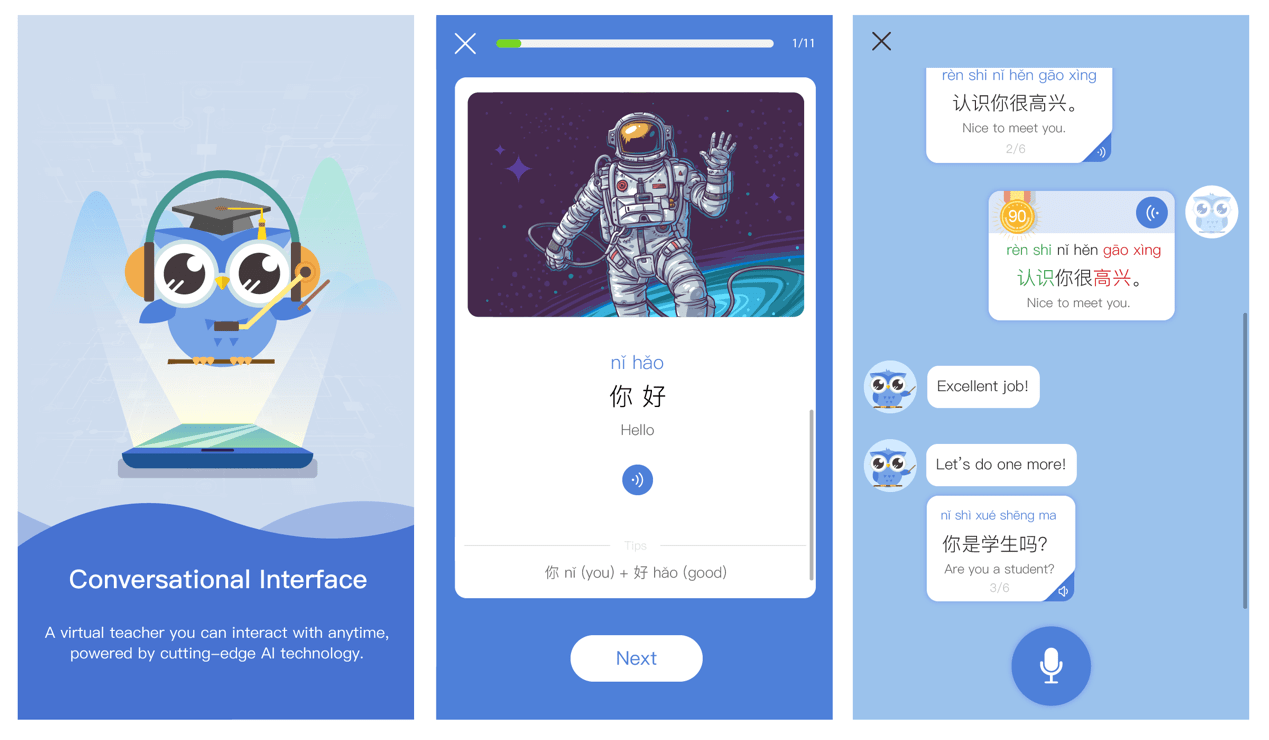
Language-learning apps are nothing new, with offerings from MIT and Duolingo ready to teach you a new way to communicate right on your phone. Now Microsoft is looking to teach you Chinese with a free new AI-powered iOS app.
The idea here is to provide users with a way to practice the Chinese language in the absence of real-life communicative partners. "You think you know Chinese, but if you meet a Chinese person and you want to speak Chinese, there is no way you can do it if you have not practiced," said Microsoft's Yan Xia in a blog post. "Our application addresses this issue by leveraging our speech and natural language processing technology." There's no word on plans to expand to other languages, but it's not hard to see such an app helping you learn to converse in different tongues, too.
The app uses various AI tools like deep neural networks that are able to figure out what you're trying to say and then evaluate your pronunciation. The AI has been trained on data from native Chinese speakers as well as Microsoft's text-to-speech technology. As you use the app, you'll get scored on your speaking ability and highlighted words that you need to work on, plus sample audio to hear how the words are actually pronounced. So far, the app has separate systems for beginners and intermediate learners to better help you move forward from your level of expertise. "The app will work with you as a language learning partner," Xia said in the post. "It will chat with you and give you feedback based on what you are saying."
Source: engadget










