
NEWS

There is Now a Steve Jobs Figure from DAM Toys

11/27/2017

2769

From the late ’70s on, Steve Jobs was instrumental in changing the way that people interacted with technology. Though no longer with us, Jobs’ legacy and his legend lives on through his work. Now, that legend has brought to life a new tribute of the mogul: his very own deluxe figure!


Via Bleeding Cool, DAM Toys is planning to release a 1/6-scale high end figure of Steve Jobs, and as you can see from the picture below, the company has done an impressive job of recreating his likeness. DAM Toys even used their new figure to echo one of the most famous photos of Jobs.
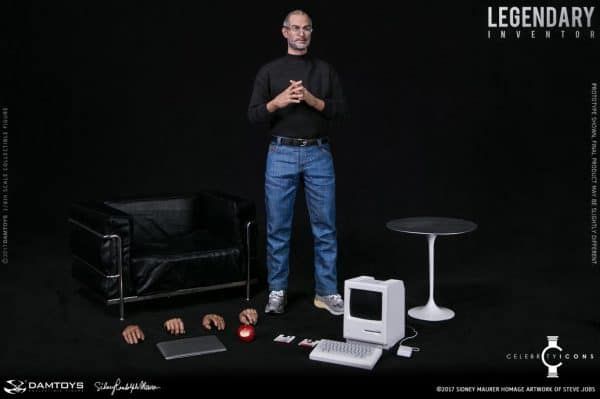

There is Now a Steve Jobs Figure from DAM Toys


The figure seems to be based on Jobs’ later years at Apple, when he often made presentations while wearing a black sweater, jeans, and tennis shoes. But instead of outfitting Jobs with some of his more famous innovations like the iPod, the iMac, or the iPhone, DAM Toys went old school and gave the figure an Apple MAC and floppy disks as its primary accessories.


The Jobs figure has several points of articulation as well as interchangeable hands that will allow fans to place Jobs in some of his signature poses.


DAM Toys hasn’t yet released the information about how much the Steve Jobs figure will cost or when it will be released.


Source: nerdist

Windows
Mac OS
iOS
Linux
3uTools
Win 64-bit For this device
V9.0 2025-11-11
Download
Win 32-bit For this device
V9.0 2025-11-11
Download
3uTools
Intel Chip How to Identify Chip Type
V9.0 2025-12-02
Download
Apple Silicon
V9.0 2025-12-02
Download
How to Identify Chip Type
1.  Click the Apple icon in the top-left corner of the screen and select About This Mac.
2.  Check the Processor or Chip field to determine if it is "Intel" or "Apple".
Please use the 3uTools PC client to install the iOS client:
1、 Install either the Windows or Mac version of 3uTools on your computer
2、 Open the PC client and connect your device to the computer via USB cable
3、 After the connection is successful, wait for the computer to automatically install the mobile app for the device, or locate “Install Mobile App” on the computer and manually click to install.
3uTools
deb file
V3.01 2025-11-20
Download
rpm file
V3.01 2025-11-20
Download
Windows
Windows
iOS
iOS
Android
Android
TV
TV
3uAirPlayer
Win 64-bit For this device
V6.0.2 2025-11-19
Download
Win 32-bit For this device
V6.0.2 2025-11-19
Download
iOS Device Mirroring (No App Required)
1、 Install 3uAirPlayer on the Windows PC
2、 Open Control Center and select Screen Mirroring
3、 From the list, choose your PC to start mirroring
4、 Or connect your iOS device to the PC via USB to begin mirroring
Scan to get "3uAirPlayer" App
3uAirPlayer TV V1.0.18
2025-11-28
TV System Requirements: Android 7.0 or later
Download the TV installation package, copy it to a USB drive, insert it into your TV or set-top box, then select the file from the home screen to install.




