
NEWS

AT&T's Network Down for Some Users, iPhone Owners Unable to Make Calls

11/16/2017

3406

AT&T appears to be experiencing some kind of outage, and many AT&T customers across the United States are unable to make and answer phone calls. 

There are numerous reports of issues on Twitter, and we had also been unable to place calls on an iPhone associated with AT&T. The problem appears to have begun at least 30 minutes ago. 
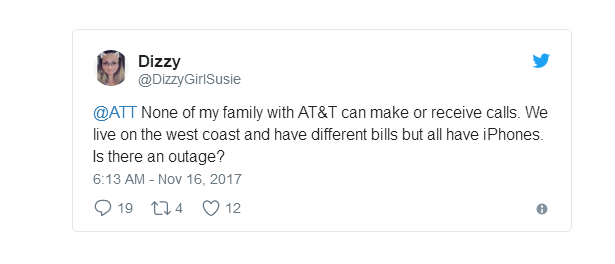
AT&T's Network Down for Some Users, iPhone Owners Unable to Make Calls


Customers affected by the problem who attempt to make a phone call are seeing the calls they place immediately disconnected. Incoming phone calls go directly to voicemail, and customers are not able to answer them. 


Many users have been able to fix the phone call problem by restarting their iPhones, so affected customers should try that right away to attempt to resolve it. 

If a restart doesn't work, customers who need to place calls to friends and family members can still use FaceTime or FaceTime Audio. iMessages and text messages are also working at the current time. 


Source: macrumor

Windows
Mac OS
iOS
Linux
3uTools
Win 64-bit For this device
V9.0 2025-11-11
Download
Win 32-bit For this device
V9.0 2025-11-11
Download
3uTools
Intel Chip How to Identify Chip Type
V9.0 2025-12-02
Download
Apple Chip
V9.0 2025-12-02
Download
How to Identify Chip Type
1.  Click the Apple icon in the top-left corner of the screen and select About This Mac.
2.  Check the Processor or Chip field to determine if it is "Intel" or "Apple".
Please use the 3uTools PC client to install the iOS client:
1、 Install either the Windows or Mac version of 3uTools on your computer
2、 Open the PC client and connect your device to the computer via USB cable
3、 After the connection is successful, wait for the computer to automatically install the mobile app for the device, or locate “Install Mobile App” on the computer and manually click to install.
3uTools
deb file
V3.01 2025-11-20
Download
rpm file
V3.01 2025-11-20
Download
Windows
Windows
iOS
iOS
Android
Android
TV
TV
3uAirPlayer
Win 64-bit For this device
V6.0.2 2025-11-19
Download
Win 32-bit For this device
V6.0.2 2025-11-19
Download
iOS Device Mirroring (No App Required)
1、 Install 3uAirPlayer on the Windows PC
2、 Open Control Center and select Screen Mirroring
3、 From the list, choose your PC to start mirroring
4、 Or connect your iOS device to the PC via USB to begin mirroring
Scan to get "3uAirPlayer" App
3uAirPlayer TV V1.0.18
2025-11-28
TV System Requirements: Android 7.0 or later
Download the TV installation package, copy it to a USB drive, insert it into your TV or set-top box, then select the file from the home screen to install.




