
NEWS

Apple iPhone X Displays showing A Green Line Due to Hardware Defect

11/13/2017

4699

A few iPhone X owners are experiencing a ‘green line of death’ on the phone’s display, Macrumors reports. A vertical line has popped up on the side of some of Apple’s iPhone X edge-to-edge OLED screens, leaving frustrated users to report the issue on Twitter.


Some users say they have tried to restore the phone, but a ‘mysterious’ green line still exists. It’s not clear what exactly causing the issue, but it could be an electrical fault, notes TechCrunch. The same issues has affected the Galaxy S7 in which pink lines appeared. Samsung acknowledged the issue and even replaced the faulty units. Apple seems to be aware of the issue, but has yet to officially acknowledge it. One of the iPhone X owners has reported that Apple exchanged the faulty unit, meaning Apple certainly knows the issue. This also indicates that the problem cannot be solved through a software update.
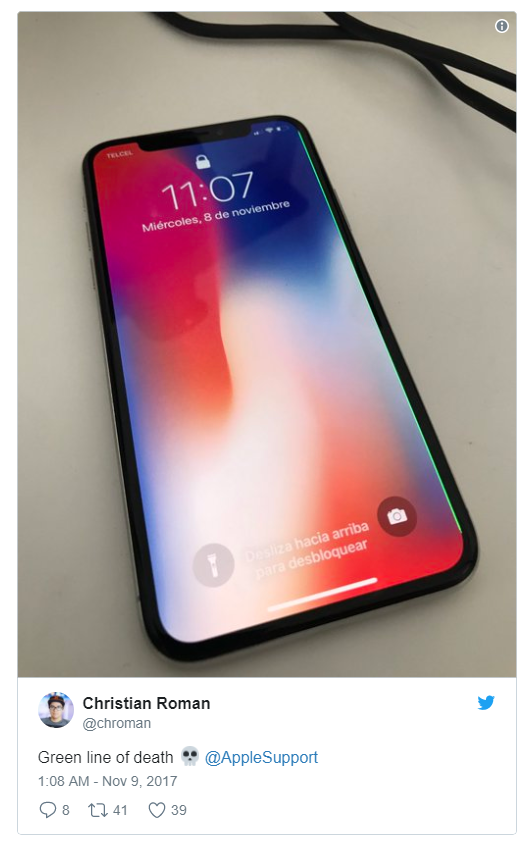

Apple iPhone X Displays showing A Green Line Due to Hardware Defect


Flaws like these are increasingly becoming common with recently launched flagship smartphones. Since the availability of the Pixel 2 XL, Google’s premium smartphone has faced a number of issues with the display. And earlier last month, iPhone 8’s battery swelling issue was widely reported. Apple acknowledge the issue by releasing a statement. Last year, Samsung’s Galaxy Note 7 was in the center of storm due to explosive batteries. Not only did the Galaxy Note 7 fiasco cost the company billions of dollars, it badly tarnished Samsung’s reputation.


Source: indiaexpress

Windows
Mac OS
iOS
Linux
3uTools
Win 64-bit For this device
V9.0 2025-11-11
Download
Win 32-bit For this device
V9.0 2025-11-11
Download
3uTools
Intel Chip How to Identify Chip Type
V9.0 2025-12-02
Download
Apple Chip
V9.0 2025-12-02
Download
How to Identify Chip Type
1.  Click the Apple icon in the top-left corner of the screen and select About This Mac.
2.  Check the Processor or Chip field to determine if it is "Intel" or "Apple".
Please use the 3uTools PC client to install the iOS client:
1、 Install either the Windows or Mac version of 3uTools on your computer
2、 Open the PC client and connect your device to the computer via USB cable
3、 After the connection is successful, wait for the computer to automatically install the mobile app for the device, or locate “Install Mobile App” on the computer and manually click to install.
3uTools
deb file
V3.01 2025-11-20
Download
rpm file
V3.01 2025-11-20
Download
Windows
Windows
iOS
iOS
Android
Android
TV
TV
3uAirPlayer
Win 64-bit For this device
V6.0.2 2025-11-19
Download
Win 32-bit For this device
V6.0.2 2025-11-19
Download
iOS Device Mirroring (No App Required)
1、 Install 3uAirPlayer on the Windows PC
2、 Open Control Center and select Screen Mirroring
3、 From the list, choose your PC to start mirroring
4、 Or connect your iOS device to the PC via USB to begin mirroring
Scan to get "3uAirPlayer" App
3uAirPlayer TV V1.0.18
2025-11-28
TV System Requirements: Android 7.0 or later
Download the TV installation package, copy it to a USB drive, insert it into your TV or set-top box, then select the file from the home screen to install.




