 NEWS
NEWS
Apple Now Letting Apple IDs With Third-Party Email Addresses Be Updated to Apple Email Addresses
 11/02/2017
 3640
3640
Apple today made a small change to the way Apple IDs work, and for the first time, Apple customers who have an Apple ID that uses a third-party email address can update that Apple ID to use an Apple @icloud.com, @me.com, or @mac.com email address.
Prior to today, an Apple ID that used a third-party email address could be changed to another third-party email address, but there wasn't an option to use one of the Apple email accounts that are created when an Apple ID is made. 
The change was outlined by MacRumors reader Dillon, who sent an email to several executives earlier this month asking for the problem to be changed. Dillon was contacted by Apple Executive Relations last week and was told Apple's engineering team would look into the problem. He received a second phone call today, letting him know the issue had been fixed. From Dillon:
"For a long time if you had an Apple ID that used a 3rd party email address as your Apple ID you were unable to change it to an Apple email address... even if the Apple address was on the same account.
I couple of weeks ago I sent an email addressed to Tim Cook, Craig Federighi, Phil Schiller, and Eddy Cue. I explained the situation and asked if they could fix it. Last week I received an email and phone call from someone at Apple Executive Relations. The women I spoke to told me that the problem would be sent to an engineering team and would be addressed. Today I got another call and email informing me that the issue had been resolved.
I tried it out and sure enough... I can finally set my Apple email as my Apple ID!"
Apple's "Change Your Apple ID" support document was today updated to reflect the updates made to the Apple ID, and it now includes a section confirming a third-party email address can be changed to an @icloud.com, @me.com, or @mac.com email address. 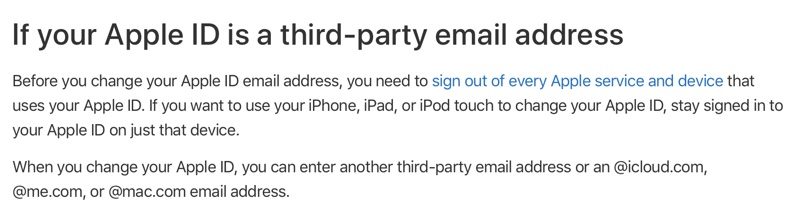
When swapping from a third-party Apple ID email address to an email address ending in @icloud.com, @me.com, or @mac.com, Apple warns that there is no way to change it back to a third-party email account.
If you enter a new Apple ID that ends with @icloud.com, @me.com, or @mac.com, you see a message to confirm. When you change your Apple ID to an @icloud.com, @me.com, or @mac.com account, you can't change it back to a third-party email account. Your former Apple ID that ends with a third-party email, becomes an additional email address for your Apple ID account.
This should be a welcome change for all Apple customers who have wanted to change their Apple ID addresses to an official Apple email address. Those who want to go ahead and swap should read Apple's support document and follow all of the steps, which include signing out of all iOS devices before making the change.
Update: While this feature is working for some users, others report being unable to change their Apple IDs. It's possible this feature has not yet rolled out to all users, or that it's not fully functional as of yet. It's unclear at this point why it's not working for some people.
Source: macrumors










