 NEWS
NEWS
Polish Retailer Listing Leaks AirPower Could Be Priced at $199
 11/02/2017
 3824
3824
Apple now supports wireless charging with the iPhone 8 and iPhone X, but it isn’t selling its own charging pad yet. Instead, Apple Stores offer charging pads that support the Qi standard from Belkin and Mophie, each priced at $59.99.
The company did preview AirPower which it will start selling sometime next year, but the official release date and price are still unknown. Now a Polish retailer has published an online listing for AirPower which could give us a clue about how much we’ll have to pay for the special charging pad.
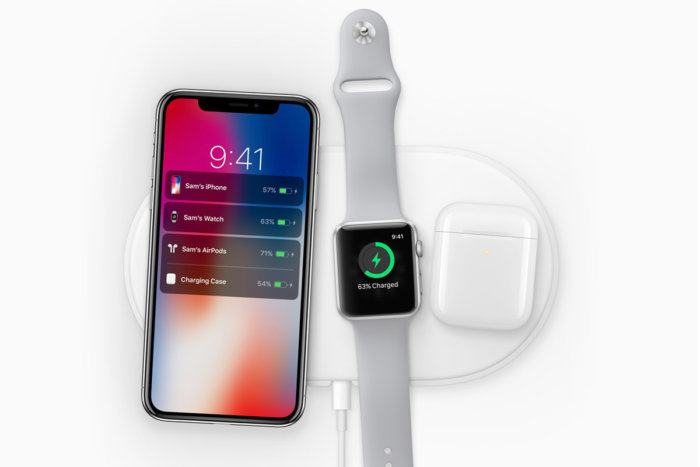
Unlike existing Qi charging pads, AirPower will support up to three compatible devices for simultaneous wireless charging thanks to technology developed by Apple. AirPower will only work with iPhone 8 / 8 Plus / X, Apple Watch Series 3, and an upcoming version of the AirPods charging case, but Apple says it will help the Qi standard adopt multi-device charging support in the future.
Considering AirPower has special Apple technology and is essentially three wireless chargers in one, we can probably expect to pay a hefty price, right? ThinkApple points out that a Polish retailer X-Com has a new online listing for AirPower which is priced at 999 PLN. That converts to about $270, but ThinkApple notes that products on Apple’s online store in Poland that are priced at 999 PLN go for around $199 in the US online store.
Could this mean AirPower will actually be sold for $199 when it launches next year? My take is that it’s likely a placeholder listing from the Polish retailer who likely wouldn’t have inside knowledge of how Apple plans to price its unreleased product, but the roughly $200 price point wouldn’t be totally surprising.
Source: 9to5mac










