
NEWS

First iPhone X Orders Start Shipping to Customers from Apple and Carriers

10/30/2017

3353

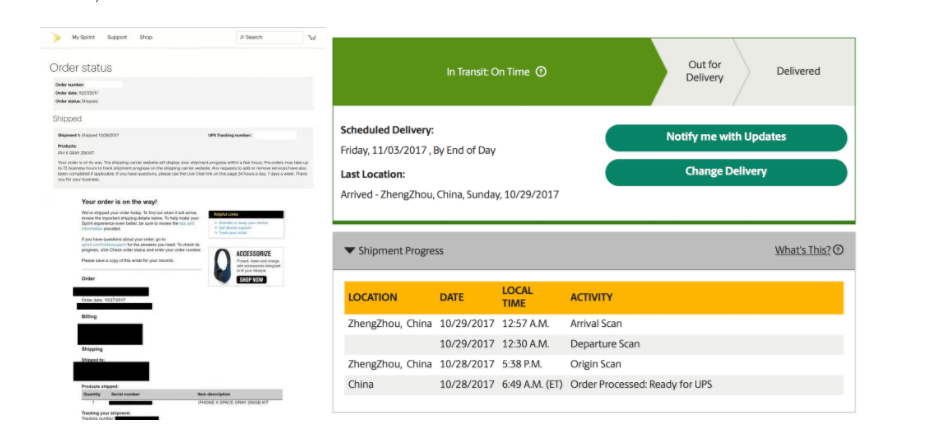
Not long after pre-orders began yesterday morning, the first iPhone X orders have started shipping to customers. While Apple has yet to update order statues on its website, some customers who purchased the device through their carrier have started receiving shipping notifications…

First iPhone X Orders Start Shipping to Customers from Apple and Carriers


As of right now, it appears that Sprint is the first carrier to start sending shipping notifications to customers. In the email, Sprint includes tracking information, but the UPS website has yet to be updated with information regarding delivery date and current location.


Meanwhile, if you ordered through Apple, you may be able to check that status of your shipment using your UPS My Choice account. Here, you’ll be able to see tracking information and estimated delivery dates. Alternatively, you can attempt to input your phone number and zip code into the UPS website to view information.


Personally, my order is still listed as “Preparing to ship…” on Apple’s website, but using UPS My Choice reveals the tracking number and November 3rd delivery date. The important thing to note here, however, is that even if you’re order has already shipped, it’s incredibly unlikely that your device will arrive any earlier than November 3rd. Apple always asks carriers like UPS and FedEx to hold orders until the actual release date.


Source: 9to5mac

Windows
Mac OS
iOS
Linux
3uTools
Win 64-bit For this device
V9.0 2025-11-11
Download
Win 32-bit For this device
V9.0 2025-11-11
Download
3uTools
Intel Chip How to Identify Chip Type
V9.0 2025-12-02
Download
Apple Chip
V9.0 2025-12-02
Download
How to Identify Chip Type
1.  Click the Apple icon in the top-left corner of the screen and select About This Mac.
2.  Check the Processor or Chip field to determine if it is "Intel" or "Apple".
Please use the 3uTools PC client to install the iOS client:
1、 Install either the Windows or Mac version of 3uTools on your computer
2、 Open the PC client and connect your device to the computer via USB cable
3、 After the connection is successful, wait for the computer to automatically install the mobile app for the device, or locate “Install Mobile App” on the computer and manually click to install.
3uTools
deb file
V3.01 2025-11-20
Download
rpm file
V3.01 2025-11-20
Download
Windows
Windows
iOS
iOS
Android
Android
TV
TV
3uAirPlayer
Win 64-bit For this device
V6.0.2 2025-11-19
Download
Win 32-bit For this device
V6.0.2 2025-11-19
Download
iOS Device Mirroring (No App Required)
1、 Install 3uAirPlayer on the Windows PC
2、 Open Control Center and select Screen Mirroring
3、 From the list, choose your PC to start mirroring
4、 Or connect your iOS device to the PC via USB to begin mirroring
Scan to get "3uAirPlayer" App
3uAirPlayer TV V1.0.18
2025-11-28
TV System Requirements: Android 7.0 or later
Download the TV installation package, copy it to a USB drive, insert it into your TV or set-top box, then select the file from the home screen to install.




