 NEWS
NEWS
iPhone X Preorders List for Crazy Money on eBay
 10/30/2017
 3400
3400
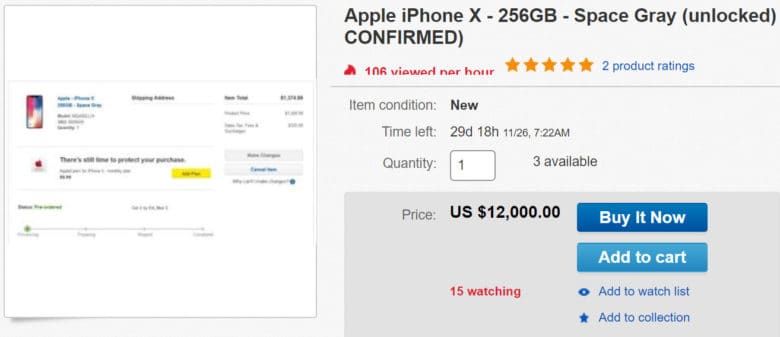
Within minutes of iPhone X going on sale, initial stock of preorder units sold out. Not everyone who secured a handset for launch day delivery plans to keep their fancy new fetish phone, however.
Lucky early birds are already listing their iPhone X preorders on eBay, with some asking for crazy money — as much as $12,000!
If you didn’t score an iPhone X in the early moments of the maddening preorder, you must wait five to six weeks for shipping from the Apple online store now. It’s likely the wait will grow even longer by the end of the day, and it’s a similar story with carriers and third-party retailers.
Your only prayer of securing one earlier is to head to your local Apple Store on November 3 in the hope that they have enough units to go around. Based on recent reports, however, Apple simply cannot produce enough to meet demand.
The other option is to buy an iPhone X from someone else — and pay an inflated price. iPhone X handsets are already flooding eBay, but sellers aren’t charging the same as Apple. They’re adding huge premiums on top to make a quick buck, and some are being incredibly greedy.
Some sellers are asking for $12,000
Many iPhone X eBay listings ask for in excess of $2,000. That’s two times the amount Apple charges for a 64GB model. Others ask for $3,500 plus $700 for shipping! Some sellers stupidly hope to collect as much as $12,000 from their units.
Not all of these will sell. But plenty of iPhone fans with oodles of cash will be willing to pay a premium to avoid a lengthy wait for Apple’s iPhone of the future. Many eBay sellers will easily double their money overnight.
Don’t be one of those iPhone fans. Sure, iPhone X looks like a spectacular upgrade, but it’s already costly at $999. Don’t pay over the odds just to get one earlier. Wait it out or try to pick one up from an authorized reseller on, or soon after, launch day.
Source: cult of mac










