
NEWS

Would You Rather Get Rid of Glass Backs, Even If It Costs Wireless Charging?

10/27/2017

2895

Over the past few years, wireless charging has been all the craze in the smartphone world. Most major manufacturers have steadily been moving towards making the feature a standard and are working on making it work faster.

But since the current version of wireless charging — that's inductive charging — doesn't work then the phone's exterior is pure metal, manufacturers have turned to glass backs.
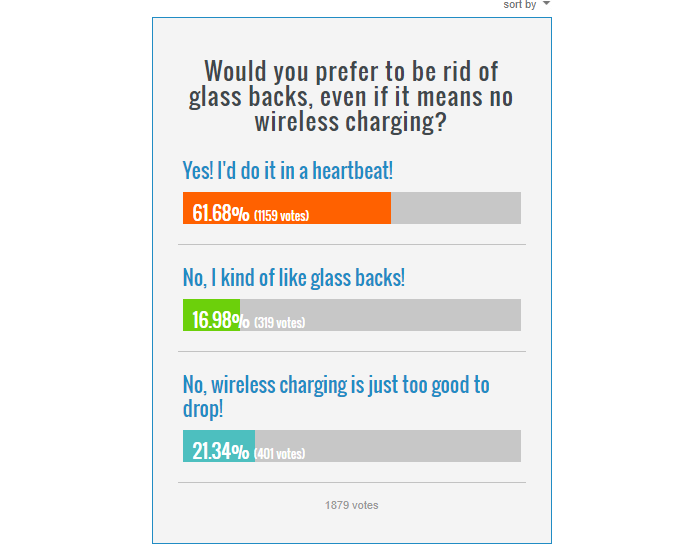
Would You Rather Get Rid of Glass Backs, Even If It Costs Wireless Charging?


And glass looks nice, sure — it's shiny, it's cool to the touch, it just reeks of "premium". But it's also a magnet for fingerprint grease and feels particularly unpleasant when your hands are sweaty. Thus, not everyone is a fan of glass backs.

So, we thought we'd ask you. Is wireless charging worth having a glass back on your phone, or would you rather stick with a pure metal build and forfeit wireless charging? If your phone doesn't have a glass back, vote based on preference.


Source: phonearena

Windows
Mac OS
iOS
Linux
3uTools
Win 64-bit For this device
V9.0 2025-11-11
Download
Win 32-bit For this device
V9.0 2025-11-11
Download
3uTools
Intel Chip How to Identify Chip Type
V9.0 2025-12-02
Download
Apple Chip
V9.0 2025-12-02
Download
How to Identify Chip Type
1.  Click the Apple icon in the top-left corner of the screen and select About This Mac.
2.  Check the Processor or Chip field to determine if it is "Intel" or "Apple".
Please use the 3uTools PC client to install the iOS client:
1、 Install either the Windows or Mac version of 3uTools on your computer
2、 Open the PC client and connect your device to the computer via USB cable
3、 After the connection is successful, wait for the computer to automatically install the mobile app for the device, or locate “Install Mobile App” on the computer and manually click to install.
3uTools
deb file
V3.01 2025-11-20
Download
rpm file
V3.01 2025-11-20
Download
Windows
Windows
iOS
iOS
Android
Android
TV
TV
3uAirPlayer
Win 64-bit For this device
V6.0.2 2025-11-19
Download
Win 32-bit For this device
V6.0.2 2025-11-19
Download
iOS Device Mirroring (No App Required)
1、 Install 3uAirPlayer on the Windows PC
2、 Open Control Center and select Screen Mirroring
3、 From the list, choose your PC to start mirroring
4、 Or connect your iOS device to the PC via USB to begin mirroring
Scan to get "3uAirPlayer" App
3uAirPlayer TV V1.0.18
2025-11-28
TV System Requirements: Android 7.0 or later
Download the TV installation package, copy it to a USB drive, insert it into your TV or set-top box, then select the file from the home screen to install.




