 NEWS
NEWS
Apple iOS 11.1 Release, It's A Big One
 10/26/2017
 3635
3635
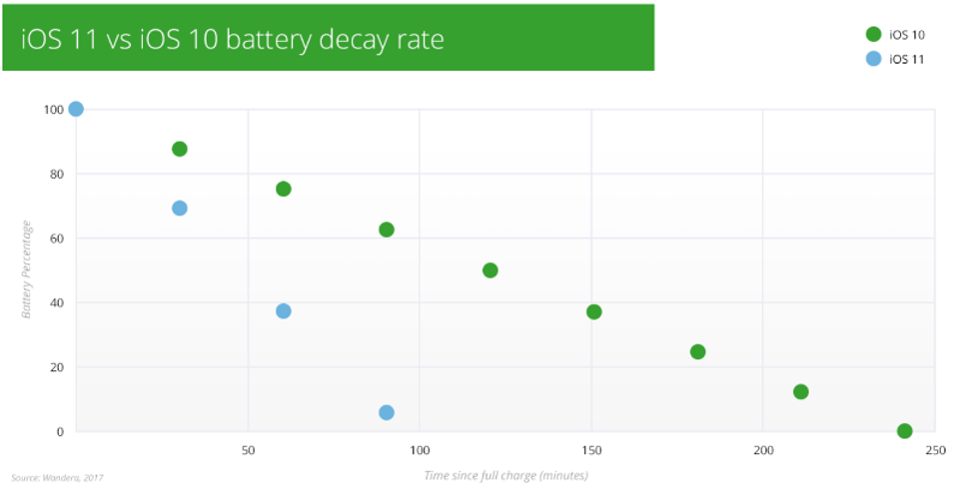
Popular YouTuber iDeviceHelp was first to spot dramatic battery improvements in iOS 11.1. His video shows an iPhone 6S Plus, iPhone 7 Plus and iPhone 8 Plus each gain up to three hours of additional screen-on time compared to when they were running iOS 11.0.3. This goes a long way to correcting the circa 60% drop many iPhones suffered after upgrading to iOS 11.
Unfortunately, however, there are two caveats.
1. A Beta Life
Firstly you can’t get iOS 11.1 without enrolling in the Apple Beta Program. That’s right, iOS 11.1 is still in beta testing and it is actually the fourth beta which has delivered these serious battery gains. That said with many reports of iPhones running iOS 11.0.3 only lasting a few hours on standby, enrollment is a simple hurdle worth jumping.
2. Usage Variation
Secondly while the real world battery improvements you get with iOS 11.1 will be significant, you can’t expect the exact figures iDeviceHelp achieved. This is because the tests are not representative of real world usage and operate simply by setting away a timer and waiting until the phone runs out.
The timer is far less demanding than the usual real world mix of social media, videos, photography and gaming so you won’t be getting the massive 6-8 hours of screen-on time iDeviceHelp achieved. That said the gains iDeviceHelp discovered were almost 40% up on iOS 11.0.3 so however you use your iPhone, it’s still going to see a massive improvement.
The Real Deal
Working with several iPhone testers, the good news is I’ve also been able to replicate the results achieved by iDeviceHelp on iOS 11.1 beta 4 as well as the newly released iOS 11 beta 5 so it is something to get excited about. Interestingly the iDeviceHelp channel has also now tested iOS 11.1 release beta 5 versus beta 4 and again shown the improvements are retained, so real tangible change is indeed coming.
At this stage Apple has yet to comment on the battery improvements iOS 11.1 brings, but that’s unsurprising since even the beta release notes don’t mention it. For now Apple is deliberately keeping this under the radar.
So when can we expect an iOS 11.1 official release?
All signs point to late October/early November to align with the release of the controversial iPhone X. The hotly anticipated flagship brings a number of new features to the range, the headliner of which is Face ID facial recognition and this functionality will be baked into iOS 11.1.
Source: Forbes










