 NEWS
NEWS
Apple and Cochlear Partner on New Hearing Implant Technology
 10/26/2017
 3226
3226
Australia-based company Cochlear on Wednesday debuted its latest hearing implant sound processor, the Nucleus 7, which was developed in cooperation with Apple to connect with and integrate sound from iPhone, iPad and iPod touch devices.
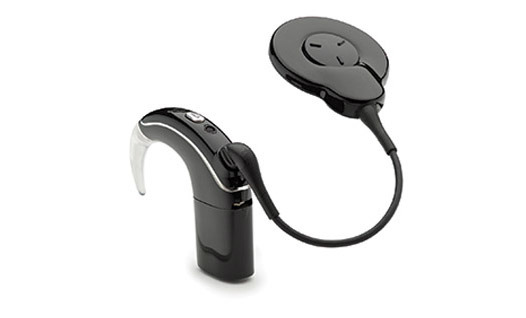
Announced in July, but in the works for years, the Made for iPhone sound processor boasts deep integration with Apple technology to deliver iOS device sound output directly to an implant embedded in a user's head.
Apple's accessibility engineering team worked with Cochlear for two to three years to develop a modified Bluetooth Low Energy protocol capable of transferring audio without rapidly depleting the hearing device's battery. Called Bluetooth Low Energy Audio, the Apple patented technology offers extended up time while maintaining high quality audio streams.
As noted by The Australian, Cochlear implant patients looking to connect to iPhone have until now been forced to use a separate Bluetooth accessory. With BLEA, however, owners of the new Nucleus 7 will have direct audio access to phone calls, music, movies and other content on a range of iOS devices.
Unlike traditional hearing aids, the Cochlear system uses a sound processor placed behind an ear to capture sound and translate it into digital signals. These signals are sent to a surgically implanted coil, which decodes the digital information and converts it into electrical pulses that are sent to an electrode array embedded in the cochlea. The pulses stimulate a patient's auditory nerve and the brain perceives this reaction as sound.
Cochlear implants are considered more effective than hearing aids, which simply amplify incoming sound. For users with severe damage to structures in the inner ear, the technology is irreplaceable.
Like most miniaturized electronic devices, sound processors suffer from battery life constraints, making it difficult to implement extra communications hardware like a Bluetooth radio. That's where BLEA comes in.
"We started looking at this program around the concept of Bluetooth LE and how it would be a beneficial tool in this specific circumstance," said Apple director of accessibility Sarah Herrlinger. "The work we have done is applicable both to hearing aids and sound processors."
Herrlinger notes development of the integrated system spanned two to three years with input from multiple hearing aid companies, including Cochlear. The technology is designed to support a wide range of hearing assistance products, as some patients might use a cochlear implant and traditional hearing aid simultaneously.
"We made this work when you may have two different devices, it may even be from two different companies," Herrlinger said.
As the world's first Made for iPhone sound processor, Nucleus 7 comes with a few unique features tied to the company's iOS app. With the app, users an adjust settings and sound processor programs, monitor battery life and access personalized hearing information. The software also boasts a feature similar to "Find My iPhone" that helps users locate a missing sound processor.
Source: appleinsider










