 NEWS
NEWS
Walmart Plans to Deploy 100,000 Macs to Save on Employee PC Costs
 10/26/2017
 3475
3475
As the world's largest retailer, Walmart is known for its "Everyday Low Prices" slogan. It's now in the planning stages of rolling out an employee Mac choice' program in an effort to save costs long term while enhancing the productivity of its employees using premium Apple hardware.

Walmart outlined its Mac choice program at this week's Jamf Nation User Conference, the largest Apple-focused IT event in the world, now being held near Jamf's headquarters in Minneapolis, Minnesota.
JNUC has previously gained attention for its previous years' presentations by IBM, where the global tech services firm detailed its own employee Mac choice program after finding significant cost savings associated with employee migrations from Windows PCs to Macs.
IBM noted that PC users drive twice the number of support calls compared to Mac users, and that PC support tickets require desk side support by IT personnel five times as often. The company's own analysis showed that each Mac deployed saves the company $270 in support costs compared to a Windows PC.
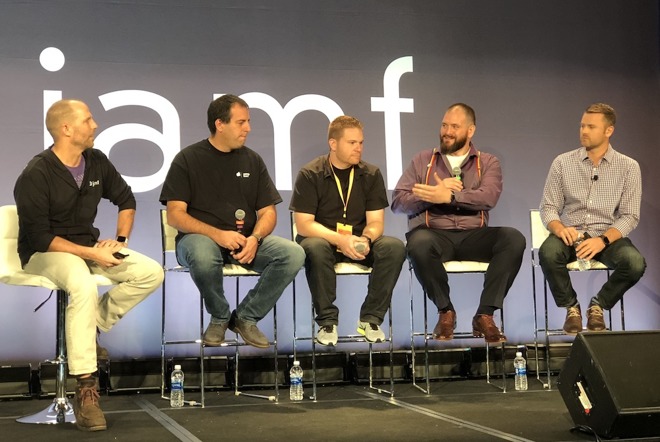
Walmart is a very different type of company, but has already found a significant drop in support costs among its current installed base of 7,000 Mac users, managed using Jamf Pro software and Apple's Device Enrollment Program.
Walmart's Technical Expert Miles Leacy (speaking below with Jamf CEO Dean Hager; Martin Lang of SAP; Ryan Kremkau of Capital One and Apple's Jeremy Butcher, on the far right) reported that across a similar set of users, Windows PCs generate about 60 percent of all support issues compared to 40 percent related to Macs.
Walmart plans to roll out an expanded Mac choice program like IBM's, and expects to deploy as many as 100,000 Macs across the next year. Leacy noted that Macs could become the default choice for new employees, given Total Cost of Ownership savings.
While Apple's premium Mac hardware typically costs more upfront than comparable Windows PCs, lower support costs, less expensive licensing fees, higher user satisfaction and higher residual value for reselling used equipment at the end of its scheduled use contribute toward what Leacy called "Everyday Low Cost" for Walmart.
Source: appleinsider










