NEWS

Google Just Redesigned Gmail for iPhone And Made it Way Faster

11/08/2016

4518

Google Just Redesigned Gmail for iPhone And Made it Way Faster


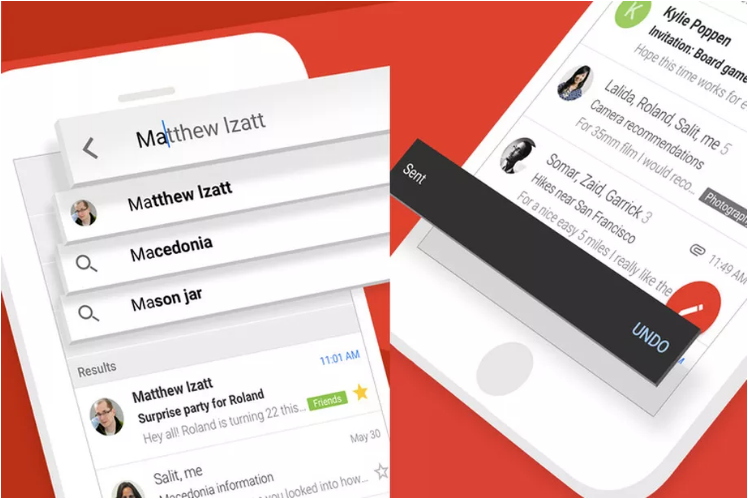
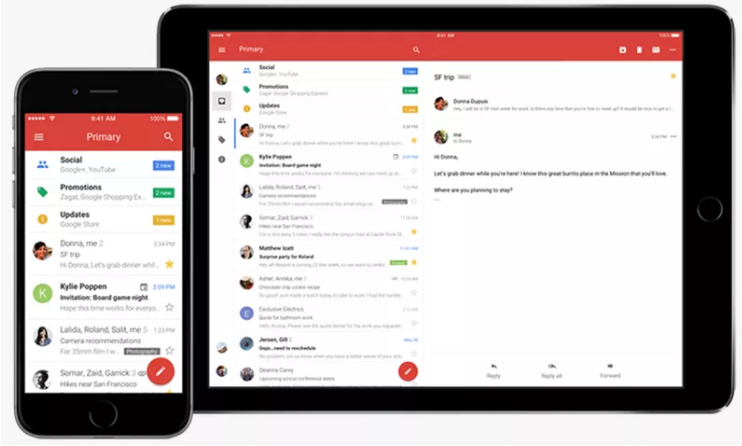
Google released a redesigned Gmail app for iPhone with performance that’s gotten “a lot faster” in the company’s own words. The “fresh new look” includes sleeker transitions that result in Gmail suddenly feeling way more like a proper app and less like a clumsy overlay for Gmail’s mobile website. For one, swiping to archive or delete messages (depending on your preference) now feels as smooth and dependable as it does on Android.


Google has also brought over one big feature from Inbox: Undo Send. This new option slides up from the bottom after you’ve fired off an email, giving you a brief opportunity to take it back before all your typos are seen and ridiculed by co-workers. Search has gotten quicker with what Google calls “instant” results and spelling suggestions.

Google Just Redesigned Gmail for iPhone And Made it Way Faster


Unfortunately, this new Gmail refresh still doesn’t include a unified inbox, so you’ve got to switch between personal and work accounts and view them individually. That alone means I’ll probably be sticking with other email apps for the time being. But if you’ve been using the Gmail app for all this time, well, that experience is getting noticeably better today.


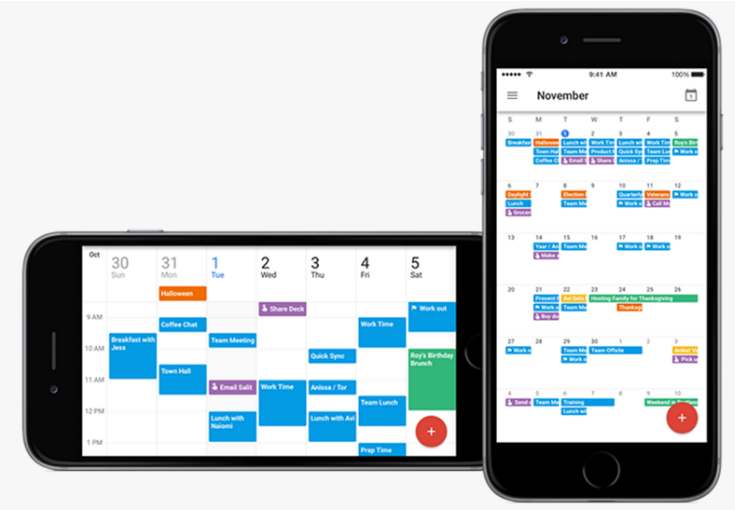
Google Calendar for iPhone is also being updated today with month view and week in landscape view — plus Spotlight search for finding your appointments, reminders, and goals. Sadly there’s still no iPad version of Google Calendar, so you’ll need another option for keeping up to date with your own life on Apple’s tablet.

Google Just Redesigned Gmail for iPhone And Made it Way Faster


Source: TheVerge


Windows
Mac OS
iOS
Linux
3uTools
Win 64-bit For this device
V9.0 2025-11-11
Download
Win 32-bit For this device
V9.0 2025-11-11
Download
3uTools
Intel Chip How to Identify Chip Type
V9.0 2025-12-02
Download
Apple Chip
V9.0 2025-12-02
Download
How to Identify Chip Type
1.  Click the Apple icon in the top-left corner of the screen and select About This Mac.
2.  Check the Processor or Chip field to determine if it is "Intel" or "Apple".
Please use the 3uTools PC client to install the iOS client:
1、 Install either the Windows or Mac version of 3uTools on your computer
2、 Open the PC client and connect your device to the computer via USB cable
3、 After the connection is successful, wait for the computer to automatically install the mobile app for the device, or locate “Install Mobile App” on the computer and manually click to install.
3uTools
deb file
V3.01 2025-11-20
Download
rpm file
V3.01 2025-11-20
Download
Windows
Windows
iOS
iOS
Android
Android
TV
TV
3uAirPlayer
Win 64-bit For this device
V6.0.2 2025-11-19
Download
Win 32-bit For this device
V6.0.2 2025-11-19
Download
iOS Device Mirroring (No App Required)
1、 Install 3uAirPlayer on the Windows PC
2、 Open Control Center and select Screen Mirroring
3、 From the list, choose your PC to start mirroring
4、 Or connect your iOS device to the PC via USB to begin mirroring
Scan to get "3uAirPlayer" App
3uAirPlayer TV V1.0.18
2025-11-28
TV System Requirements: Android 7.0 or later
Download the TV installation package, copy it to a USB drive, insert it into your TV or set-top box, then select the file from the home screen to install.