 NEWS
NEWS
Apple's Self-Driving Testbed Spotted in Silicon Valley
 04/28/2017
 4596
4596
Apple's self-driving technology testbed, an optimized Lexus RX450h SUV bristling with an array of advanced sensors, was spotted driving on Silicon Valley roads on Thursday, offering the first real-world look at the company's highly secretive autonomous vehicle project.
Photos and a short video showing Apple's RX450h were sent in to Bloomberg after a tipster saw the vehicle leaving an Apple facility.
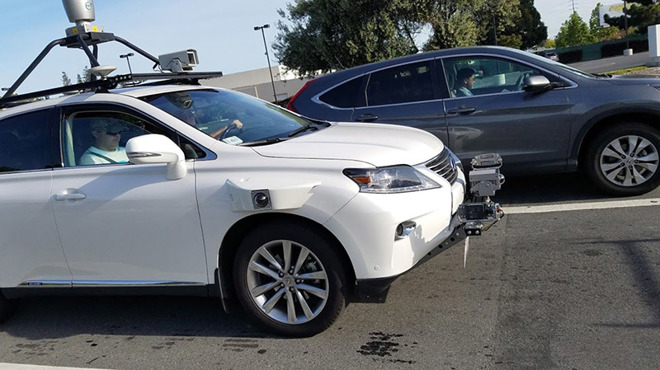
The images fail to offer much in the way of new information, but provide insight into the technology Apple is using to test its self-driving hardware and software suite. For example, a Velodyne LiDAR 64-channel unit is mounted on the SUV's roof, while radar arrays are positioned on the front and rear bumpers. Multiple cameras, mounted in protective housings along the car's exterior, likely offer a near 360-degree view of the vehicle's surroundings.
As can be expected, Apple's testbed compares nicely to other self-driving car platforms currently in testing by Google and Uber. Those vehicle systems also include some form of LiDAR, positional sensors and cameras aplenty.
Apple has long been rumored to be working on autonomous vehicle technology under its "Project Titan" initiative. A branded car was part of the initiative's original plans, but the company abandoned the aggressive goal in late 2016 after the project hit a number of snags. Formerly led by Steve Zadesky, Project Titan was later handed over to SVP of Hardware Engineering Dan Riccio and then to longtime executive Bob Mansfield. Under Mansfield, the team was whittled down and efforts refocused to self-driving software and supporting hardware.
Source: appleinsider









