
NEWS

iPhone 17 Outselling Every Other Phone Worldwide So Far This Year

05/07/2026

78

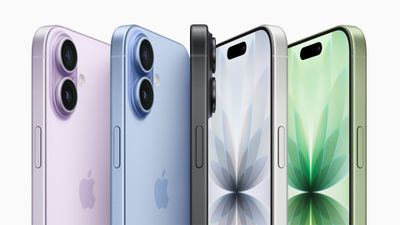
Apple's iPhone 17 was the best-selling smartphone globally in the first quarter of 2026, capturing 6 percent of worldwide unit sales, according to Counterpoint Research's latest Global Handset Model Sales Tracker.
iPhone 17 Outselling Every Other Phone Worldwide So Far This Year
The iPhone 17 series dominated the top three spots, with the iPhone 17 Pro Max in second place and the iPhone 17 Pro in third. The previous-generation iPhone 16 also held on at sixth place, suggesting there's still strong demand for the model, following its blockbuster sales run throughout last year.

Counterpoint senior analyst Harshit Rastogi credited the iPhone 17's success to upgrades that brought the base model closer to the Pro variants, including higher 256GB base storage, improved cameras, and a faster 120Hz display refresh rate. Not only did the iPhone 17 post double-digit year-over-year growth in China and the U.S., it also tripled its sales in South Korea for the quarter.

Samsung's Galaxy A series filled the remaining five spots, led by the budget-friendly Galaxy A07 4G as the best-selling Android phone of the quarter. Xiaomi's Redmi A5 filled out the list in tenth place.iPhone 17 Outselling Every Other Phone Worldwide So Far This Year
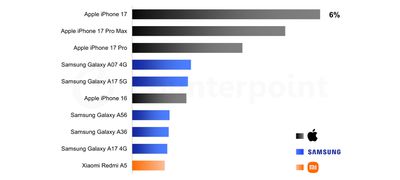
Taken together, the top 10 devices accounted for 25% of global smartphone sales -- the highest first-quarter concentration ever recorded, according to Counterpoint. In the meantime, the standard iPhone 17 is set to enjoy a six-month-longer flagship run than usual, with the iPhone 18 expected to see a launch in spring 2027.

Source: Macrumors

Windows
Mac OS
iOS
Linux
3uTools
Win 64-bit For this device
V9.06 2026-04-09
Download
Win 32-bit For this device
V9.06 2026-04-09
Download
3uTools
Intel Chip How to Identify Chip Type
V9.03 2026-03-27
Download
Apple Silicon
V9.03 2026-03-27
Download
How to Identify Chip Type
1.  Click the Apple icon in the top-left corner of the screen and select About This Mac.
2.  Check the Processor or Chip field to determine if it is "Intel" or "Apple".
Please use the 3uTools PC client to install the iOS client:
1、 Install either the Windows or Mac version of 3uTools on your computer
2、 Open the PC client and connect your device to the computer via USB cable
3、 After the connection is successful, wait for the computer to automatically install the mobile app for the device, or locate “Install Mobile App” on the computer and manually click to install.
3uTools
deb file
V9.0 2026-04-16
Download
rpm file
V9.0 2026-04-16
Download
Windows
Windows
iOS
iOS
Android
Android
TV
TV
3uAirPlayer
Win 64-bit For this device
V6.0.5 2026-04-23
Download
Win 32-bit For this device
V6.0.5 2026-04-23
Download
iOS Device Mirroring (No App Required)
1、 Install 3uAirPlayer on the Windows PC
2、 Open Control Center and select Screen Mirroring
3、 From the list, choose your PC to start mirroring
4、 Or connect your iOS device to the PC via USB to begin mirroring
Scan to get "3uAirPlayer" App
3uAirPlayer TV V1.0.18
2025-11-28
TV System Requirements: Android 7.0 or later
Download the TV installation package, copy it to a USB drive, insert it into your TV or set-top box, then select the file from the home screen to install.




