NEWS

Apple's New Vision Pro Dual Knit Band Proves Popular

10/20/2025

3581

Apple's New Vision Pro Dual Knit Band Proves Popular


Apple introduced a new version of the Vision Pro with M5 chip this week, and it came with a Dual Knit Band that Apple says is more comfortable to wear for long periods of time. M5 Vision Pro buyers will get the new band automatically, but those who have an M2 Vision Pro also have the option to buy it separately.


It appears ‌M2‌ Vision Pro owners are eager for an accessory that makes the headset easier to wear, because the $99 Dual Knit Band is now backordered for at least a month. As of yesterday, new Dual Knit Band orders were delivering between November 7 and November 14, and wait times could get even longer.


There are some retail stores that may have the Dual Knit Band in stock starting next week, as the M5 Vision Pro will launch on Wednesday, October 22.


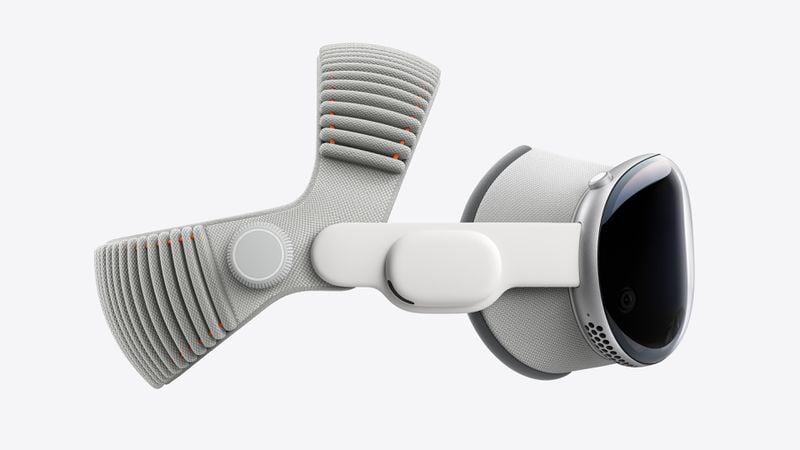
The Dual Knit Band is made from the same 3D knitted material as the Solo Knit Band, but it has a two-strap design. One strap fits at the back of the head as before, but a second strap goes over the top of the head for better weight distribution.


Apple also added tungsten inserts to the ribbed back loop for counterbalance and a fit that is supposed to improve balance and stability. Apple says that the Dual Knit Band is soft and breathable, with a Fit Dial to adjust each strap independently.


The Dual Knit Band is available in small, medium, and large sizes, and making a purchase requires using an iPhone's Face ID camera to find the right fit for your face size.


Source: Macrumors

Windows
Mac OS
iOS
Linux
3uTools
Win 64-bit For this device
V9.0 2025-11-11
Download
Win 32-bit For this device
V9.0 2025-11-11
Download
3uTools
Intel Chip How to Identify Chip Type
V9.0 2025-12-02
Download
Apple Chip
V9.0 2025-12-02
Download
How to Identify Chip Type
1.  Click the Apple icon in the top-left corner of the screen and select About This Mac.
2.  Check the Processor or Chip field to determine if it is "Intel" or "Apple".
Please use the 3uTools PC client to install the iOS client:
1、 Install either the Windows or Mac version of 3uTools on your computer
2、 Open the PC client and connect your device to the computer via USB cable
3、 After the connection is successful, wait for the computer to automatically install the mobile app for the device, or locate “Install Mobile App” on the computer and manually click to install.
3uTools
deb file
V3.01 2025-11-20
Download
rpm file
V3.01 2025-11-20
Download
Windows
Windows
iOS
iOS
Android
Android
TV
TV
3uAirPlayer
Win 64-bit For this device
V6.0.2 2025-11-19
Download
Win 32-bit For this device
V6.0.2 2025-11-19
Download
iOS Device Mirroring (No App Required)
1、 Install 3uAirPlayer on the Windows PC
2、 Open Control Center and select Screen Mirroring
3、 From the list, choose your PC to start mirroring
4、 Or connect your iOS device to the PC via USB to begin mirroring
Scan to get "3uAirPlayer" App
3uAirPlayer TV V1.0.18
2025-11-28
TV System Requirements: Android 7.0 or later
Download the TV installation package, copy it to a USB drive, insert it into your TV or set-top box, then select the file from the home screen to install.