 NEWS
NEWS
iPhone 17 Pro Could Come in Surprising Orange Color, Dummy Models Suggest
 07/30/2025
 961
961
We're just six weeks away from the launch of new iPhone models, and rumors are ramping up as September creeps closer. We've heard plenty of details about the prospective colors for the iPhone 17 lineup, but leaker Sonny Dickson today shared iPhone 17 dummy models that supposedly feature the shades that Apple has picked.
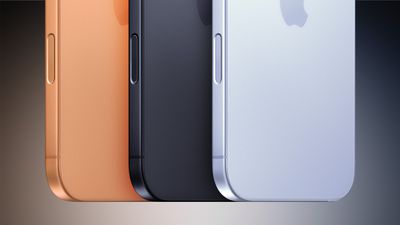
Dickson's images feature the iPhone 17 Pro models in black, white, dark blue, and orange. The orange shade is particularly bright and not typically in line with what Apple chooses for the Pro models. Apple's colors are often more muted, but it could be an issue of angle or lighting. Prior leaks suggested that the orange could be more of a copper color than a true orange, so we'll have to wait to see how closely the dummy model matches with the final color.
As for the iPhone 17 Air, the dummy models are depicted in black, white, gold, and a light blue, similar to the light blue of the MacBook Air. Those are all four colors that we've seen rumored for the iPhone 17 Air.
The iPhone 17 models are shown in black, white, blue, and a purple that looks more like a pink. Rumors have suggested the iPhone 17 could come in black, white, steel gray, purple, and light blue. The blues for the iPhone 17 and iPhone 17 Air are similar, but not identical.
Dummy model designs are often accurate, but the colors the dummy models come in don't always provide the clearest picture of what an iPhone will actually look like. Differences in lighting, sheen, and material often mean that the final version of the iPhone looks a lot better than what leaks.
Source: Macrumors









