
NEWS

iPhone with Under-Screen Face ID: What the Latest Rumors Say

01/10/2025

1472

When will the iPhone get under-screen Face ID?
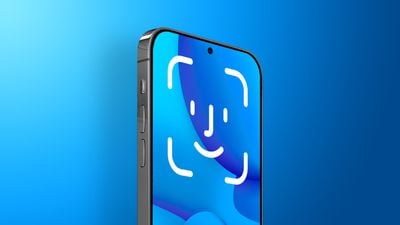
 

iPhone with Under-Screen Face ID: What the Latest Rumors Say


In April 2023, display industry analyst Ross Young shared a roadmap showing that iPhone 17 Pro models would feature under-display Face ID. In May 2024, however, Young said he heard this change had been delayed until 2026. If so, that means that under-screen Face ID could debut on the iPhone 18 Pro and iPhone 18 Pro Max next year.


iPhone 18 Pro models with under-screen Face ID would still have a pinhole at the top of the display for the front camera, similar to newer Android smartphones like Google's Pixel 9 and Samsung's Galaxy S24. It is unclear if the devices would have a Dynamic Island, a feature that helps to hide the Face ID sensors on current iPhones.


In the past, Young has said that he expects iPhones to eventually have both under-screen Face ID and an under-screen front camera.


With these changes, the iPhone could eventually have a true all-screen design.


Source: Macrumors

Windows
Mac OS
iOS
Linux
3uTools
Win 64-bit For this device
V9.0 2025-11-11
Download
Win 32-bit For this device
V9.0 2025-11-11
Download
3uTools
Intel Chip How to Identify Chip Type
V9.0 2025-12-02
Download
Apple Silicon
V9.0 2025-12-02
Download
How to Identify Chip Type
1.  Click the Apple icon in the top-left corner of the screen and select About This Mac.
2.  Check the Processor or Chip field to determine if it is "Intel" or "Apple".
Please use the 3uTools PC client to install the iOS client:
1、 Install either the Windows or Mac version of 3uTools on your computer
2、 Open the PC client and connect your device to the computer via USB cable
3、 After the connection is successful, wait for the computer to automatically install the mobile app for the device, or locate “Install Mobile App” on the computer and manually click to install.
3uTools
deb file
V3.01 2025-11-20
Download
rpm file
V3.01 2025-11-20
Download
Windows
Windows
iOS
iOS
Android
Android
TV
TV
3uAirPlayer
Win 64-bit For this device
V6.0.2 2025-11-19
Download
Win 32-bit For this device
V6.0.2 2025-11-19
Download
iOS Device Mirroring (No App Required)
1、 Install 3uAirPlayer on the Windows PC
2、 Open Control Center and select Screen Mirroring
3、 From the list, choose your PC to start mirroring
4、 Or connect your iOS device to the PC via USB to begin mirroring
Scan to get "3uAirPlayer" App
3uAirPlayer TV V1.0.18
2025-11-28
TV System Requirements: Android 7.0 or later
Download the TV installation package, copy it to a USB drive, insert it into your TV or set-top box, then select the file from the home screen to install.




