
NEWS

13-Inch iPad Pro Magic Keyboard ~50 Grams Lighter Than Older Model

05/15/2024

1546

Apple's new Magic Keyboard accessory for the latest iPad Pro models is "thinner and lighter" than the model it replaces, according to the company.
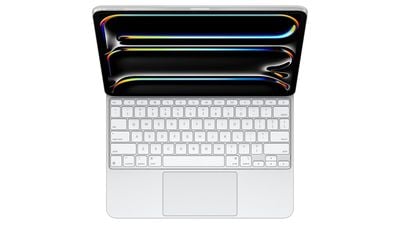
 

13-Inch iPad Pro Magic Keyboard ~50 Grams Lighter Than Older Model


Apple typically does not provide weight specifications for iPad accessories, but some early reviewers have effectively confirmed Apple's claims with their own figures for the 13-inch version of the Magic Keyboard.


Six Colors' Jason Snell weighed the 13-inch Magic Keyboard at 667 grams, while Brian Tong put the accessory at 662 grams and The Verge recorded 658 grams on its scales.

Despite the small variations, from these figures we can conclude that the 13-inch Magic Keyboard is around 50 grams lighter than the previous generation model, which weighed around 710 grams.


It's worth noting that at 580 grams, the new 13-inch ‌iPad Pro‌ itself is much lighter than the previous generation 12.9-inch ‌iPad Pro‌, which weighed 682 grams.


Based on these numbers, the total weight of the ‌iPad Pro‌ and Magic Keyboard is around 1,247 grams, which is exceedingly close to the stated 1.24 kg weight of Apple's M3-powered 13-inch MacBook Air.


Meanwhile, the 11-inch Magic Keyboard is 580 grams, according to a MacRumors forum member who received theirs early. In comparison, previous model weighs 601 grams.


Source: Macrumors

Windows
Mac OS
iOS
Linux
3uTools
Win 64-bit For this device
V9.0 2025-11-11
Download
Win 32-bit For this device
V9.0 2025-11-11
Download
3uTools
Intel Chip How to Identify Chip Type
V9.0 2025-12-02
Download
Apple Silicon
V9.0 2025-12-02
Download
How to Identify Chip Type
1.  Click the Apple icon in the top-left corner of the screen and select About This Mac.
2.  Check the Processor or Chip field to determine if it is "Intel" or "Apple".
Please use the 3uTools PC client to install the iOS client:
1、 Install either the Windows or Mac version of 3uTools on your computer
2、 Open the PC client and connect your device to the computer via USB cable
3、 After the connection is successful, wait for the computer to automatically install the mobile app for the device, or locate “Install Mobile App” on the computer and manually click to install.
3uTools
deb file
V3.01 2025-11-20
Download
rpm file
V3.01 2025-11-20
Download
Windows
Windows
iOS
iOS
Android
Android
TV
TV
3uAirPlayer
Win 64-bit For this device
V6.0.2 2025-11-19
Download
Win 32-bit For this device
V6.0.2 2025-11-19
Download
iOS Device Mirroring (No App Required)
1、 Install 3uAirPlayer on the Windows PC
2、 Open Control Center and select Screen Mirroring
3、 From the list, choose your PC to start mirroring
4、 Or connect your iOS device to the PC via USB to begin mirroring
Scan to get "3uAirPlayer" App
3uAirPlayer TV V1.0.18
2025-11-28
TV System Requirements: Android 7.0 or later
Download the TV installation package, copy it to a USB drive, insert it into your TV or set-top box, then select the file from the home screen to install.




