 NEWS
NEWS
Apple Introduces iPhone 12 and iPhone 12 mini in a Stunning New Purple
 04/22/2021
 2871
2871
The new finish complements the beautiful flat-edge design of iPhone 12, which features an advanced dual-camera system, Super Retina XDR display with the Ceramic Shield front cover, A14 Bionic, and 5G
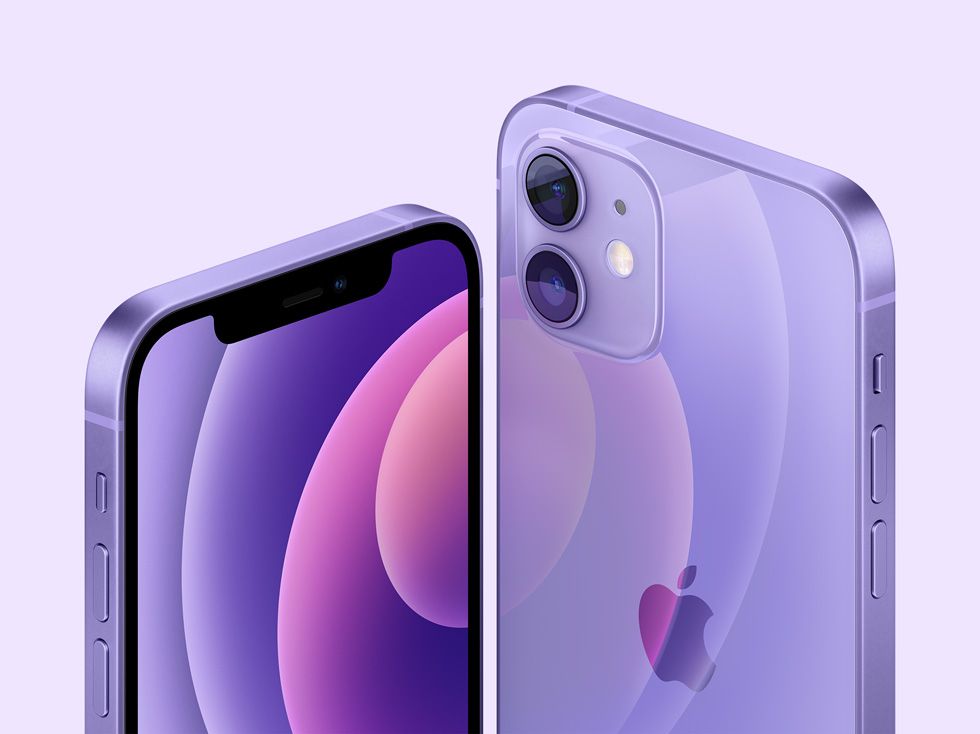
The stunning purple finish for iPhone 12 and iPhone 12 mini beautifully complements the sophisticated flat-edge design and precision-milled back glass.
Apple today unveiled an all-new stunning purple finish for iPhone 12 and iPhone 12 mini. This new color beautifully accentuates the flat aluminum edges of iPhone 12, which are perfectly color-matched to the precision-milled back glass. Both models feature an advanced dual-camera system that delivers powerful computational photography features and the highest-quality video in a smartphone, with expansive edge-to-edge Super Retina XDR displays with OLED for a brighter, more immersive viewing experience, and the Ceramic Shield front cover, providing the biggest jump in durability ever on iPhone. The Apple-designed A14 Bionic — the fastest chip in a smartphone — powers every experience on iPhone 12 while efficiently managing battery life. iPhone 12 models also bring the best 5G experience, and introduce high-powered wireless charging with MagSafe and a new ecosystem of accessories that easily attach to iPhone.
iPhone 12 and iPhone 12 mini in purple will be available for pre-order beginning Friday, April 23, with availability beginning Friday, April 30. Customers can also complement their iPhone with a new MagSafe Leather Case or Leather Sleeve in Deep Violet, a Silicone Case in Capri Blue, Pistachio, Cantaloupe, or Amethyst, or a Leather Wallet in Arizona, all available to order beginning today.
“The incredible iPhone 12 is the most popular smartphone in the world, and the iPhone 12 family has an over 99 percent customer satisfaction rate. The new purple finish, just in time for spring, adds another bright and fun option to the lineup, and we think customers are going to love it,” said Greg Joswiak, Apple’s senior vice president of Worldwide Marketing. “This gorgeous new color joins the iPhone 12 and iPhone 12 mini family, which is available in five other stunning finishes, and features an advanced dual-camera system, Super Retina XDR display, improved durability, A14 Bionic — the fastest chip ever in a smartphone — great battery life, and the best 5G experience on any smartphone.”
iPhone 12 and iPhone 12 mini feature all-screen Super Retina XDR displays that stretch further to the edges, with systemwide color management for industry-leading color accuracy. This new OLED provides pixel precision brightness, 2 million-to-1 contrast ratio for true blacks, and an immersive HDR viewing experience for high-definition video, photos with more detail, and nearly twice the peak brightness of iPhone 11.
iPhone 12 and iPhone 12 mini have an industry-leading IP68 rating for water resistance up to 6 meters for up to 30 minutes, and are protected against everyday spills, including coffee and soda.
Source: Apple









