 NEWS
NEWS
Apple Patent Reveals Smart Ring System for AR, VR, and MR Applications
 03/12/2021
 2333
2333
The US Patent & Trademark Office today published a patent application from Apple relating to its smart ring project, which could be used with AR, VR, and MR applications. This is the latest evidence of Apple’s continued work in AR and VR.
As reported by Patently Apple, this is not the first time the company has applied for a smart ring patent. It all started in 2015, and last March, Apple won a patent for a ring accessory that is specifically designed to work with VR glasses and/or a headset that is more accurate than wearing VR gloves.
This newer patent uses a different method with a self-mixing interferometry (SMI) sensor-based gesture input system. The majority of the invention relates to a smart ring being used alone or in pairs, with or without an Apple Pencil for AR, VR, and MR applications.
An SMI sensor can be used to optically measure the relative motion (displacement) between the SMI sensor and a target (e.g., a surface or object), with sub-wavelength resolution.
In augmented reality (AR), virtual reality (VR), and mixed reality (MR) applications, as well as other applications, it can be useful to track a user’s finger movement(s) and/or identify a user’s gestures (e.g., gestures made with one or more fingers, a hand, an arm, etc.).
In the image below, the dual ring system is used in context with Mixed Reality applications. Finger rings worn on a user’s thumb and index finger may be used to identify gestures such as a pinch, zoom, and rotate.
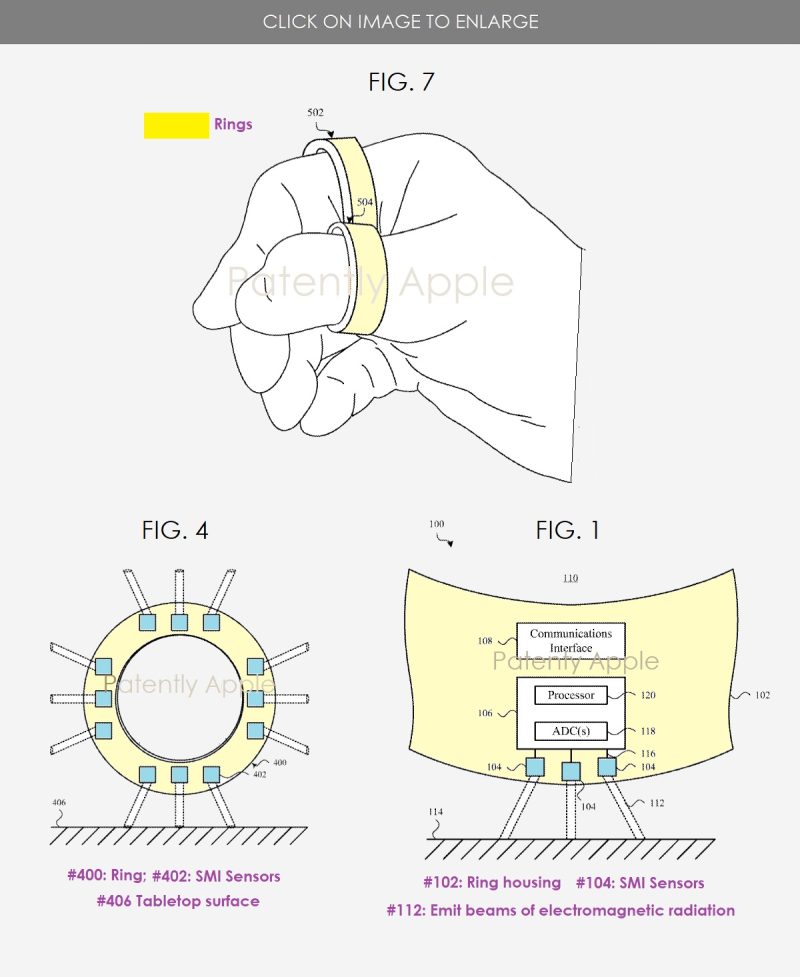
In another image, it describes how the ring could be used with an object like an Apple Pencil in AR, VR, and MR applications.
Apple files patents all the time, so now we have to wait and see if this one will become a product in the near future. It could also be used with Apple’s rumored Glasses, the VR/AR headset that could launch in 2022.
Source:9to5mac









