NEWS

Safari Translations in iOS 14 Rolling Out to More Countries

11/06/2020

2485

Safari Translations in iOS 14 Rolling Out to More Countries


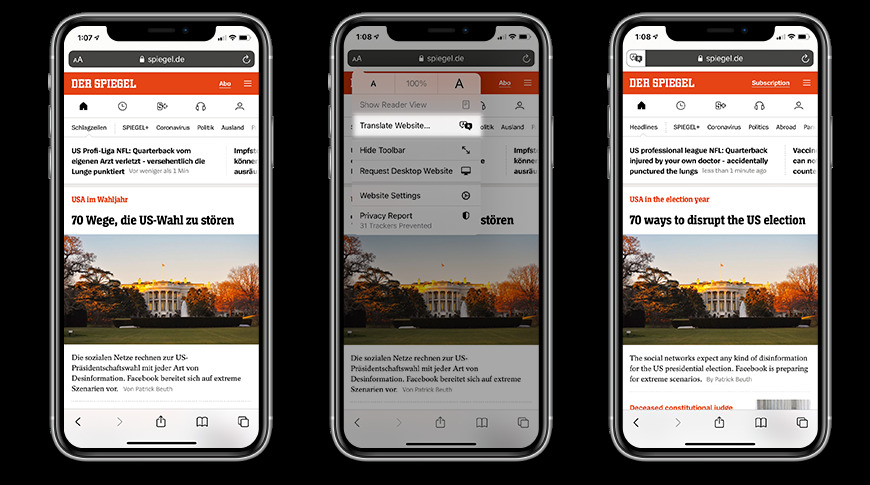
Apple is reportedly expanding access to a new iOS 14 feature that enables users to translate webpages in Safari.


Introduced with iOS 14 in September, the feature lets users translate foreign language webpages natively in Safari by tapping on the "aA" icon in the address bar. The button, initially implemented to control page font size, has now become a catchall menu for native Safari functions including website settings and privacy reports.


The Safari capability was restricted to U.S. users at launch, but has since expanded to other countries the release of iOS 14.2 on Thursday. According to 9to5Mac, the feature is now live in Brazil and Germany. Other countries might also see the translation function roll out in the coming days.


Safari translations should not be confused with the Translate app. Apple with iOS 14 also introduced a standalone Translate app that integrates text and voice translations into a clean user interface. The system is capable of translating between Arabic, Chinese, English, French, German, Italian, Japanese, Korean, Portuguese, Russian and Spanish.


Both Safari translations and the Translation app support the above eleven languages.


Source: Appleinsider

Windows
Mac OS
iOS
Linux
3uTools
Win 64-bit For this device
V9.0 2025-11-11
Download
Win 32-bit For this device
V9.0 2025-11-11
Download
3uTools
Intel Chip How to Identify Chip Type
V9.0 2025-12-02
Download
Apple Chip
V9.0 2025-12-02
Download
How to Identify Chip Type
1.  Click the Apple icon in the top-left corner of the screen and select About This Mac.
2.  Check the Processor or Chip field to determine if it is "Intel" or "Apple".
Please use the 3uTools PC client to install the iOS client:
1、 Install either the Windows or Mac version of 3uTools on your computer
2、 Open the PC client and connect your device to the computer via USB cable
3、 After the connection is successful, wait for the computer to automatically install the mobile app for the device, or locate “Install Mobile App” on the computer and manually click to install.
3uTools
deb file
V3.01 2025-11-20
Download
rpm file
V3.01 2025-11-20
Download
Windows
Windows
iOS
iOS
Android
Android
TV
TV
3uAirPlayer
Win 64-bit For this device
V6.0.2 2025-11-19
Download
Win 32-bit For this device
V6.0.2 2025-11-19
Download
iOS Device Mirroring (No App Required)
1、 Install 3uAirPlayer on the Windows PC
2、 Open Control Center and select Screen Mirroring
3、 From the list, choose your PC to start mirroring
4、 Or connect your iOS device to the PC via USB to begin mirroring
Scan to get "3uAirPlayer" App
3uAirPlayer TV V1.0.18
2025-11-28
TV System Requirements: Android 7.0 or later
Download the TV installation package, copy it to a USB drive, insert it into your TV or set-top box, then select the file from the home screen to install.