 NEWS
NEWS
iPhone 7 Tops 2016 Smartphone Performance Chart
 01/17/2017
 3293
3293
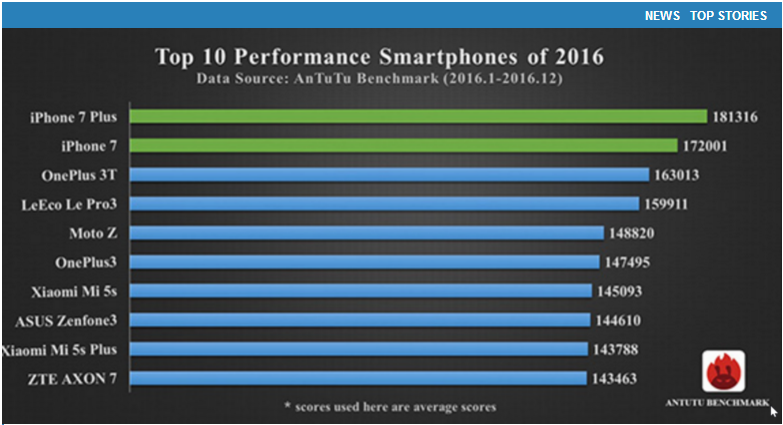
Benchmark specialists AnTuTu have put together a chart that highlights 2016’s top performing smartphones, and it’s no surprise to see iPhone 7 and iPhone 7 Plus right at the top of it.
Apple’s latest handsets grabbed the first and second spots with the highest benchmark scores, followed by the OnePlus 3T. There’s no sign of a Samsung device in the top ten.
Apple’s A-series processors have been wowing us with stellar performance every year since the original A4 made its debut in the first iPad in 2010. They outperform rival mobile chips from the likes of Qualcomm and Samsung, despite fewer cores and slower clock speeds.
The A10 Fusion inside iPhone 7 and iPhone 7 Plus is Apple’s best processor yet, with an all-new architecture that offers twice the speed and three times the graphics performance of iPhone 6. It’s also more efficient than ever before, allowing for better battery life.
In AnTuTu benchmark tests, the iPhone 7 Plus achieves a score of 181,316, while iPhone 7 clocks in at 172,001. In comparison, the fastest Android-powered handset, the OnePlus 3T, achieves a score of 163,013, while the fourth-placed LeEco Le Pro3 scores 159,911.
These are obviously average scores, and they’re reliable ones; AnTuTu only included handsets that were tested at least 2,000 times with its benchmarking apps.
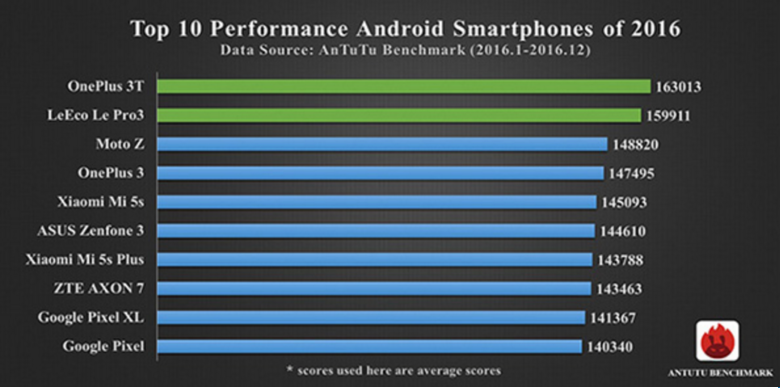
Android vendors have quite a bit of catching up to do, then. Samsung, Apple’s biggest rival in the mobile space, doesn’t even have a device in the top ten. Even if you take iOS devices out of the list and focus on Android handsets only, Samsung still doesn’t appear.
If we focus exclusive on iOS devices, the 12.9-inch iPad Pro tops the chart with a score of 194,838, followed by the iPhone 7 Plus. The 9.7-inch iPad Pro just about outpaces the iPhone score of 172,140 to snatch third place, while iPhone 6s Plus is in fifth, scoring 138,159.
Source: cultmac









