 NEWS
NEWS
iPhone 12 Supports iOS Updates Over 5G, But Users Might Need to Manually Activate Feature
 10/23/2020
 3138
3138
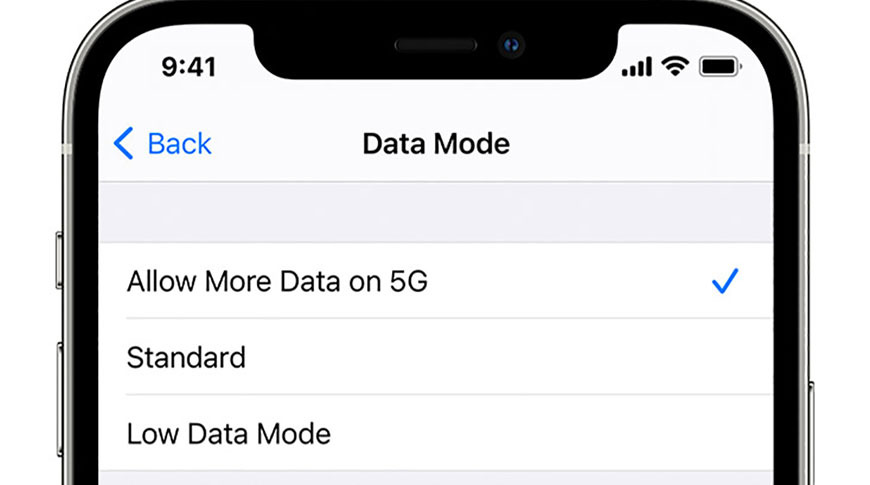
An Apple support document published this week notes iPhone 12 series handsets support 5G downloads of iOS updates, though some users might need to manually enable the feature.
Apple outlined the capabilities of iPhone 12 series 5G data modes in a support document published Tuesday. Along with all-5G, all-LTE and a so-called "Smart Data Mode," which automatically toggles cellular connectivity between 5G and LTE depending on network speeds, iOS provides three data throughput settings for iPhone 12 devices: Allow More Data on 5G, Standard, and Low Data Mode.
Users benefit from high-quality FaceTime calls, high-definition video and audio, and iOS updates over cellular with Allow More Data. In addition, third-party apps are unleashed to use more cellular data for "enhanced experiences." This setting is automatically selected as iPhone's default with certain unlimited-data plans on a carrier-by-barrier basis.
Apple states that the Standard data mode, which enables automatic updates and background tasks over cellular, is "generally" the default selection for most carriers. The middle-of-the-road mode drops FaceTime and video and audio quality settings to "standard" levels. Low Data Mode reduces both Wi-Fi and cellular data usage by pausing automatic updates and background tasks, Apple says.
While Apple's description makes it fairly clear that iOS update downloads are exclusive to Allow More Data, an internal support document from Verizon confirms the restriction, reports MacRumors.

Apple does not specify which U.S. carrier plans will automatically enable Allow More Data on iPhone 12. Those looking to take advantage of the high data rate option can navigate to Settings > Cellular > Cellular Data Options — or Settings > Cellular for Dual SIM — and toggle their preferred setting under Data Mode.
Apple's iPhone 12, iPhone 12 mini, iPhone 12 Pro and iPhone 12 Pro Max are the tech giant's first handsets to incorporate 5G connectivity. The speedy protocol is in its early stages, but is expected to be a boon for power users as it proliferates and matures over the coming years.
That speed comes with a price. On Tuesday, early tests showed a two hour reduction in battery life on iPhone 12 and iPhone 12 Pro running on 5G as compared to LTE. Apple is aware of the tradeoff and has integrated the aforementioned Smart Data Mode to increase handset longevity.
Source: Appleinsider









