NEWS

Apple Tech is Being Used to Track the Speed of U.S. Reopening

07/09/2020

2707

Apple Tech is Being Used to Track the Speed of U.S. Reopening


Apple technologies and data are being used to track the reopening of the U.S. economy amid the global coronavirus health crisis.


For example, CNN has built a tool tracking Apple Store reopenings and re-closures as a way of visualizing the virus' spread throughout the U.S.


Apple shuttered all of its U.S. locations in March and began cautiously reopening them in mid-June. A second COVID-19 spike in the country has since prompted the company to re-close at least 77 of those reopened locations.


As CNN points out, its data map may offer "another window into into the ongoing health crisis — and the health of the country's economy." Apple has a vast retail footprint in the U.S., and its stockpiles of cash allow it to be especially proactive in closing stores for safety.


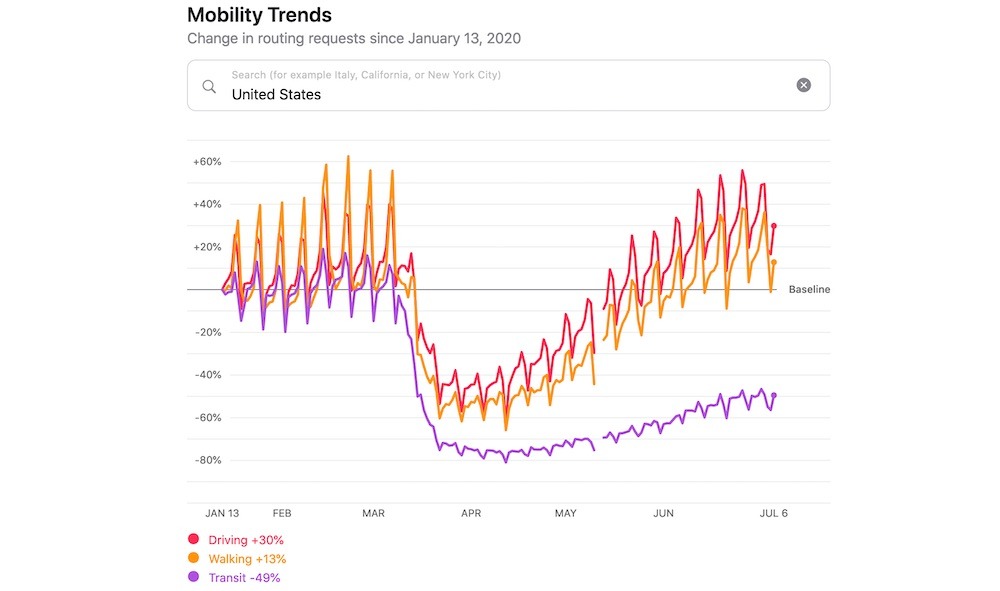
Another news outlet, CNBC, has taken to using Apple's Mobility Trend Reports as a way to track how often people are traveling during COVID-19.


According to CNBC, there has been a slowdown in Apple Maps navigation requests since the second spike in coronavirus cases — something it


Earlier in July, a report indicated that oil traders were also using Apple Mobility Trends data to predict fuel demand recovery amid COVID-19 lockdowns. They were ultimately left disappointed, since the data is based on search information and not miles traveled.


Source: Appleinsider

Windows
Mac OS
iOS
Linux
3uTools
Win 64-bit For this device
V9.0 2025-11-11
Download
Win 32-bit For this device
V9.0 2025-11-11
Download
3uTools
Intel Chip How to Identify Chip Type
V9.0 2025-12-02
Download
Apple Chip
V9.0 2025-12-02
Download
How to Identify Chip Type
1.  Click the Apple icon in the top-left corner of the screen and select About This Mac.
2.  Check the Processor or Chip field to determine if it is "Intel" or "Apple".
Please use the 3uTools PC client to install the iOS client:
1、 Install either the Windows or Mac version of 3uTools on your computer
2、 Open the PC client and connect your device to the computer via USB cable
3、 After the connection is successful, wait for the computer to automatically install the mobile app for the device, or locate “Install Mobile App” on the computer and manually click to install.
3uTools
deb file
V3.01 2025-11-20
Download
rpm file
V3.01 2025-11-20
Download
Windows
Windows
iOS
iOS
Android
Android
TV
TV
3uAirPlayer
Win 64-bit For this device
V6.0.2 2025-11-19
Download
Win 32-bit For this device
V6.0.2 2025-11-19
Download
iOS Device Mirroring (No App Required)
1、 Install 3uAirPlayer on the Windows PC
2、 Open Control Center and select Screen Mirroring
3、 From the list, choose your PC to start mirroring
4、 Or connect your iOS device to the PC via USB to begin mirroring
Scan to get "3uAirPlayer" App
3uAirPlayer TV V1.0.18
2025-11-28
TV System Requirements: Android 7.0 or later
Download the TV installation package, copy it to a USB drive, insert it into your TV or set-top box, then select the file from the home screen to install.