 NEWS
NEWS
'iPhone 12' Packaging Render Points to Lack of EarPods, AC Adapter
 07/08/2020
 3041
3041
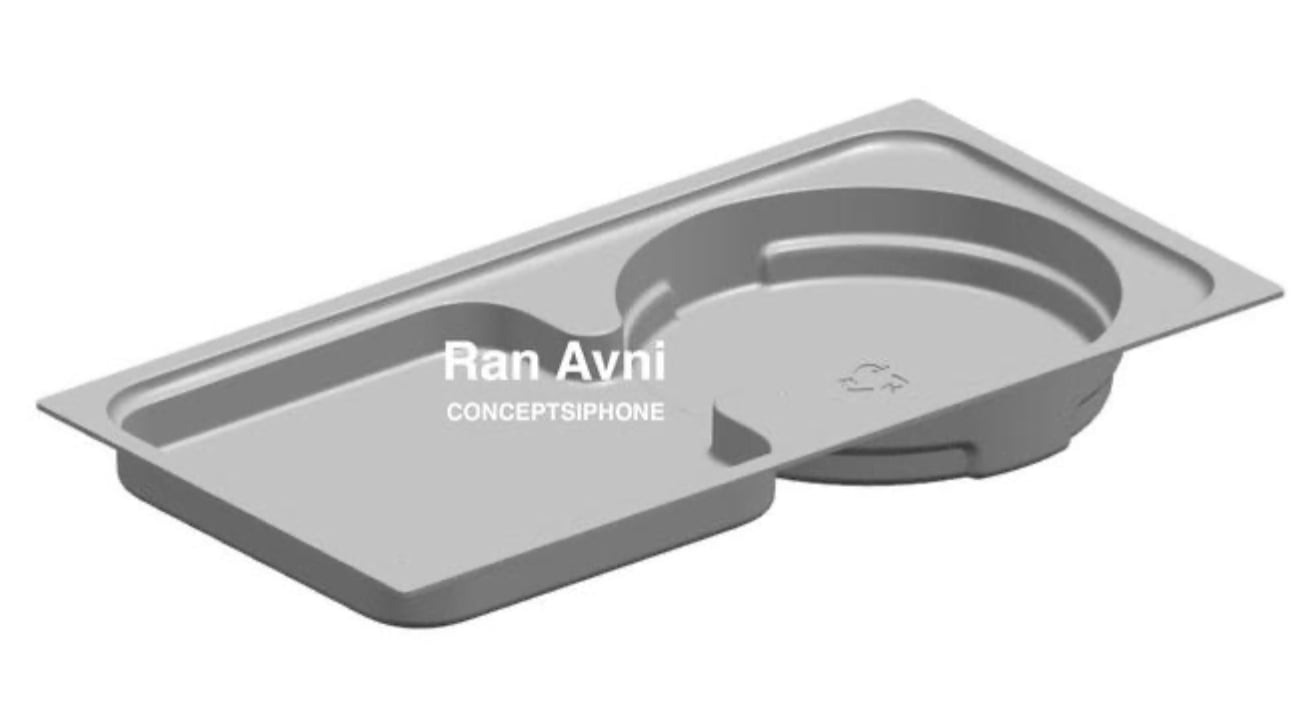
A render of what is claimed to be the box insert for the "iPhone 12" shows a notable lack of space for a charger or EarPods.
Rumors and speculation surrounding the 2020 generation of iPhones has, in recent weeks, covered items that may or may not be included alongside the smartphones. Claims have been made about Apple dropping EarPods and power adapters for the next set of releases, effectively providing the new iPhone owner with just the device and a few peripheral items.
In a rendered image provided to AppleInsider by Ran Avni and claimed to have been acquired from a "reliable source," the box insert that could be used for the "iPhone 12" suggests there will be a lack of major elements. Resting just below the iPhone itself, the insert usually holds a number of important elements and has cavities to match the items, but the version shown offers little capacity for items in general.
Two cavities are shown, consisting of a shallow square element and a circular section, with the former likely to be used for any documentation or stickers Apple issues, while the latter may hold the usual Lightning cable. Neither of the sections are deep enough to hold substantial electronics, like a charger or earphones.
While the move to remove the charger and EarPods from the package will help reduce the overall cost of the purchase to customers, as well as saving Apple money in the process, it could also make the overall packaging for the iPhone smaller.
The removal of EarPods was predicted by analyst Ming-Chi Kuo in May to help boost sales of AirPods, possibly dovetailing with some form of promotion. As for the charger, users will be expected to use their existing collection of USB power accessories, though they may also move to purchase a new 20-watt USB-C charger that is reportedly close to shipping.
Despite the rumors, it remains to be seen whether Apple will make such a major change to how it packages its products.
Source: Appleinsider









