NEWS

iOS 13 Now Installed on 81% of All Compatible iPhones

06/22/2020

2855

iOS 13 Now Installed on 81% of All Compatible iPhones


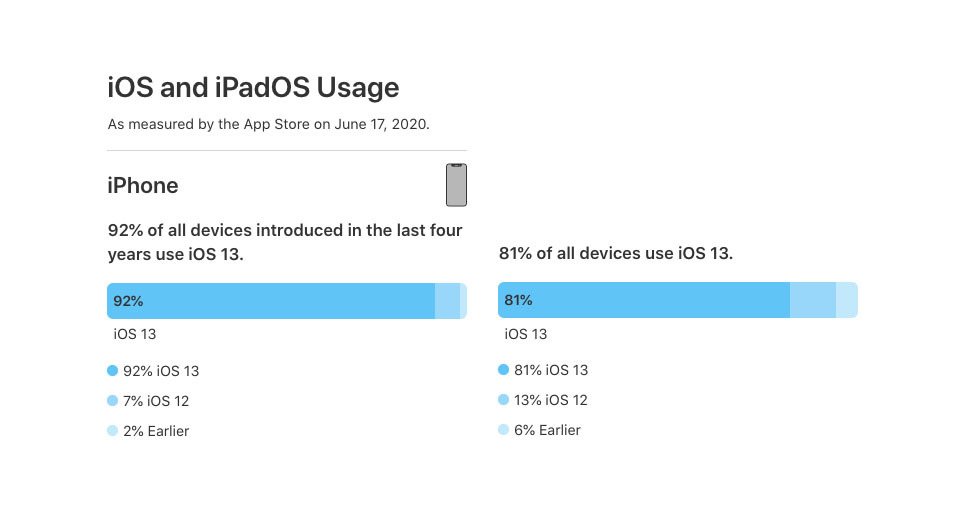
Apple on Friday released new iOS adoption statistics that indicate iOS 13 is installed on 81% of all compatible iPhones.


The new iOS figures, revealed in an update to Apple's App Store developer support webpage ahead of 2020's virtual Worldwide Developers Conference, also show that iOS 13 is installed on 91% of iPhones released within the last four years.


Based on the numbers, only 7% of devices within the last four years and 13% of all compatible devices are running the previous iOS 12 update.


Apple also said that 93% of iPads released in the last four years are running iPadOS. The percentage for all iPads ever released is a bit lower than iPhones, with a 73% adoption rate.


Apple's numbers were gleaned from App Store visits logged on June 17, 2020.


Like iOS 12, iOS 13 has seen a fairly rapid adoption rate. By October 2019, iOS 13 was running on 50% of all compatible devices and 55% of devices released in the four years prior.


Apple's iOS 13 update was released alongside the iPhone 11 and iPhone 11 Pro updates in September 2019. It introduced new features like Dark Mode and Sign In with Apple, as well as a revamped iPad-specific variant.


Apple is widely expected to debut its iOS 14 operating system update on Monday, June 22 during the WWDC 2020 keynote.


Source: Appleinsider

Windows
Mac OS
iOS
Linux
3uTools
Win 64-bit For this device
V9.0 2025-11-11
Download
Win 32-bit For this device
V9.0 2025-11-11
Download
3uTools
Intel Chip How to Identify Chip Type
V9.0 2025-12-02
Download
Apple Chip
V9.0 2025-12-02
Download
How to Identify Chip Type
1.  Click the Apple icon in the top-left corner of the screen and select About This Mac.
2.  Check the Processor or Chip field to determine if it is "Intel" or "Apple".
Please use the 3uTools PC client to install the iOS client:
1、 Install either the Windows or Mac version of 3uTools on your computer
2、 Open the PC client and connect your device to the computer via USB cable
3、 After the connection is successful, wait for the computer to automatically install the mobile app for the device, or locate “Install Mobile App” on the computer and manually click to install.
3uTools
deb file
V3.01 2025-11-20
Download
rpm file
V3.01 2025-11-20
Download
Windows
Windows
iOS
iOS
Android
Android
TV
TV
3uAirPlayer
Win 64-bit For this device
V6.0.2 2025-11-19
Download
Win 32-bit For this device
V6.0.2 2025-11-19
Download
iOS Device Mirroring (No App Required)
1、 Install 3uAirPlayer on the Windows PC
2、 Open Control Center and select Screen Mirroring
3、 From the list, choose your PC to start mirroring
4、 Or connect your iOS device to the PC via USB to begin mirroring
Scan to get "3uAirPlayer" App
3uAirPlayer TV V1.0.18
2025-11-28
TV System Requirements: Android 7.0 or later
Download the TV installation package, copy it to a USB drive, insert it into your TV or set-top box, then select the file from the home screen to install.