 NEWS
NEWS
iPhone's HEIC Format Causing Some Students to Fail AP Exams, Here's How to Fix It
 05/22/2020
 2962
2962
Some high school students taking their AP exams online have run into serious trouble with the HEIC image format on the iPhone and the iPad, which does not work with the website the AP College Board uses to accept tests.

As outlined by The Verge, AP exams taken by high school students in the United States have a written component, and the exam requires students to take and upload a photo of their written responses.
Some high schoolers who used an iPhone to upload the photo ran into problems with the HEIC format, which would not upload and caused the students to fail the exam. There are thousands of students who will now need to retake their AP exams, and they're unhappy that the College Board did not anticipate the error before some of the exams were conducted.
The College Board has now provided express instructions to students, letting them know to swap over to a JPEG format on their devices or to convert an HEIC image to JPEG before submitting it. Here are the College Board's instructions:
Open the Settings app.
Scroll down to Camera and tap it.
Tap on the Formats option.
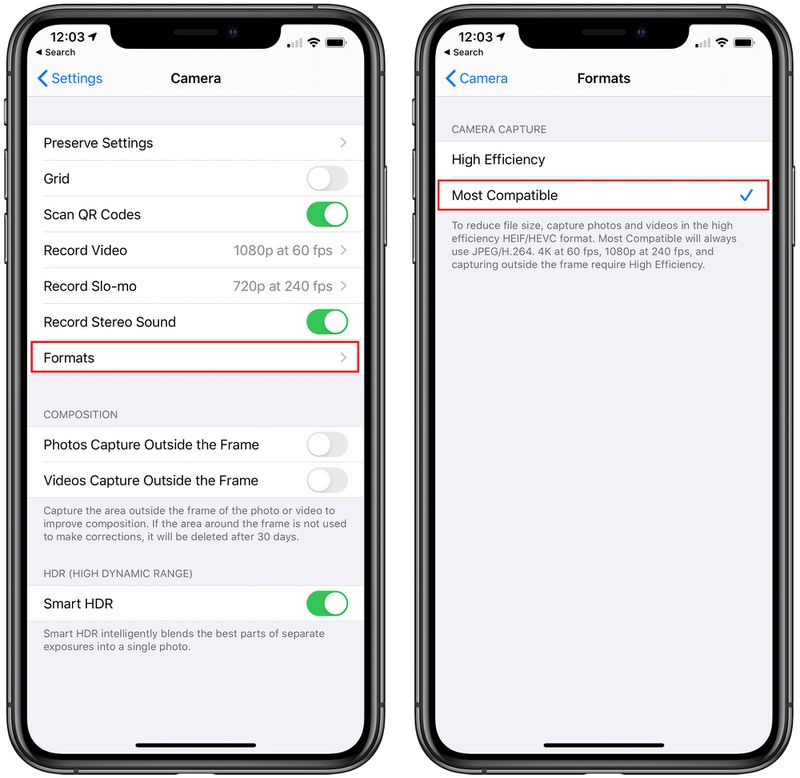
Select "Most Compatible."
With the Most Compatible option selected, photos will always be saved as JPEGs instead of in the HEIC file format.
Alternatively, students who have already saved exam photos as HEIC can convert them to JPEGs by mailing the photos to themselves using the Mail app on an iPhone or iPad, which the College Board says is the most reliable way to ensure a file conversion.
The College Board also plans to allow some students who run into issues submitting their tests to provide the images through email, and as mentioned above, the Mail app will do image conversions automatically. This is an option only for future exams, with students who already failed still required to retake the tests.
Apple has been using the HEIC image format since the 2017 release of iOS 11 because HEIC images are smaller than JPEGs, but the HEIC format has not been widely adopted by websites and internet services. Some newer Android smartphones also use the HEIC format.
Source: Appleinsider









