NEWS

Video: Early iPhone SE Teardown Highlights iPhone 8 Similarities

04/24/2020

3176

Video: Early iPhone SE Teardown Highlights iPhone 8 Similarities


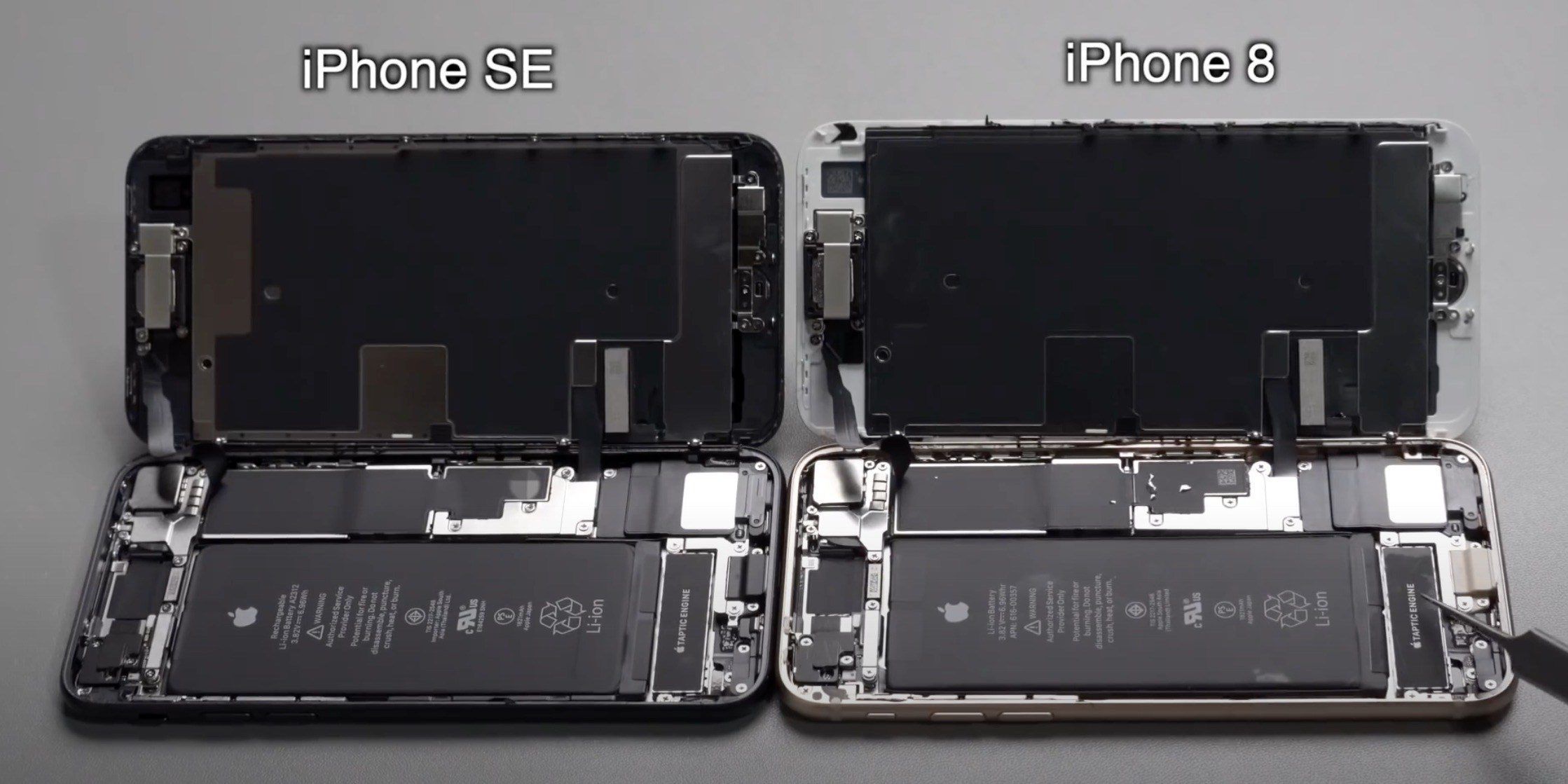
The iPhone SE is incredibly similar to the iPhone 8 it replaces in Apple’s lineup, packing the same 4.7-inch design. Now, an early teardown video shared on YouTube offers a closer look at the internal similarities between the two devices.


As first discovered by Rico Cerva on Instagram, the video offers a detailed look at the process of breaking down the iPhone SE. Internally, the device looks nearly identical to the iPhone 8, with the biggest differences including the A13 processor and a different module. The video is not in English, but there are English subtitles available.


The video even walks through the process of swapping components between the iPhone 8 and iPhone SE, with varying levels of success depending on the part. For example, switching the LCD hardware between both devices does work, but swapping the camera hardware does not.


The first iPhone SE orders are expected to arrive to customers starting tomorrow, April 24. We expect to see more teardown videos emerge soon, alongside hands-on content from users. For now, you can check out the full video below for a close look at the iPhone SE internals compared with the iPhone 8 below.


Source: 9to5mac

Windows
Mac OS
iOS
Linux
3uTools
Win 64-bit For this device
V9.0 2025-11-11
Download
Win 32-bit For this device
V9.0 2025-11-11
Download
3uTools
Intel Chip How to Identify Chip Type
V9.0 2025-12-02
Download
Apple Chip
V9.0 2025-12-02
Download
How to Identify Chip Type
1.  Click the Apple icon in the top-left corner of the screen and select About This Mac.
2.  Check the Processor or Chip field to determine if it is "Intel" or "Apple".
Please use the 3uTools PC client to install the iOS client:
1、 Install either the Windows or Mac version of 3uTools on your computer
2、 Open the PC client and connect your device to the computer via USB cable
3、 After the connection is successful, wait for the computer to automatically install the mobile app for the device, or locate “Install Mobile App” on the computer and manually click to install.
3uTools
deb file
V3.01 2025-11-20
Download
rpm file
V3.01 2025-11-20
Download
Windows
Windows
iOS
iOS
Android
Android
TV
TV
3uAirPlayer
Win 64-bit For this device
V6.0.2 2025-11-19
Download
Win 32-bit For this device
V6.0.2 2025-11-19
Download
iOS Device Mirroring (No App Required)
1、 Install 3uAirPlayer on the Windows PC
2、 Open Control Center and select Screen Mirroring
3、 From the list, choose your PC to start mirroring
4、 Or connect your iOS device to the PC via USB to begin mirroring
Scan to get "3uAirPlayer" App
3uAirPlayer TV V1.0.18
2025-11-28
TV System Requirements: Android 7.0 or later
Download the TV installation package, copy it to a USB drive, insert it into your TV or set-top box, then select the file from the home screen to install.