 NEWS
NEWS
Mac Shipments Estimated to Be Down Over 20% While Demand Surges in Q1 2020
 04/13/2020
 3684
3684
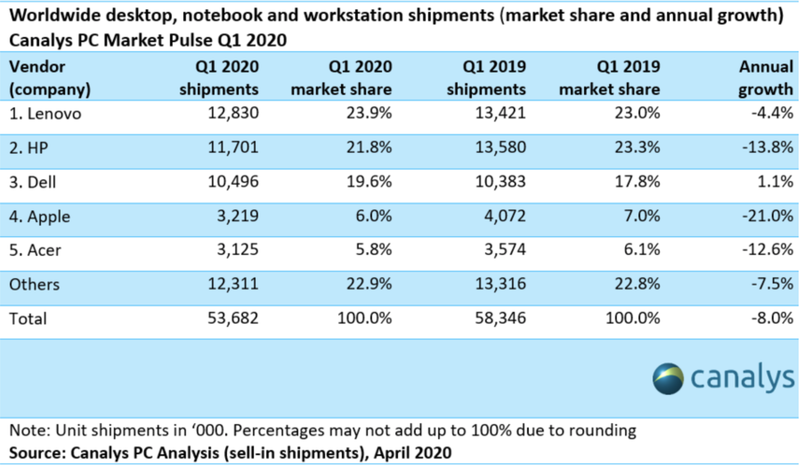
Apple's Mac shipments are estimated to have been down over 20 percent in the first quarter of 2020, according to new data shared by Canalys this week. The shuttering of businesses and factories around the world has caused "severe delay in production and logistical issues", leading to a worldwide PC shipment fall of eight percent year on year.

Top vendor rankings remained stable, with Lenovo continuing to lead the PC market with 12.8 million units shipped. HP came second with 11.7 million units, followed by Dell with 10.5 million units.
Apple shipped an estimated four million Macs in the first quarter of 2019, dropping to 3.2 million in the first quarter of 2020, a decline of 21 percent. This is a greater year-over-year decline than seen by any of the other top five vendors, including Lenovo, HP, Dell, and Acer.
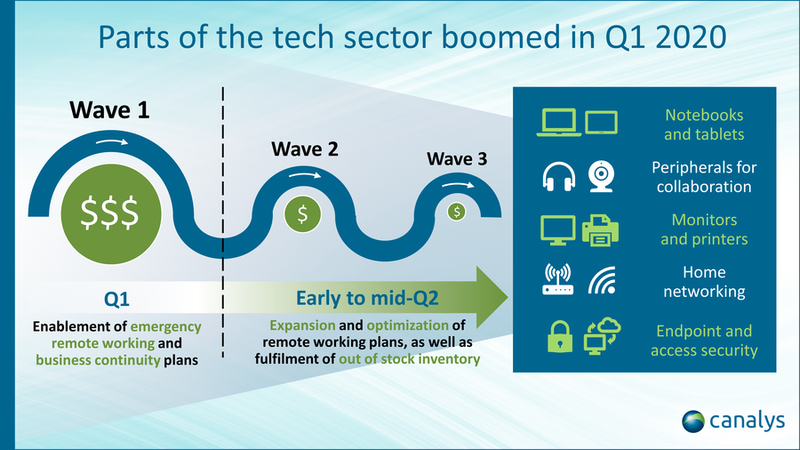
In spite of falling shipments, demand has soared in the first quarter of 2020, driven by remote working and learning requirements from strict lockdown measures across the world. Canalys predicts that vendors will report healthy profits over the coming weeks, with operating margin percentages reaching all-time highs.
Canalys also notes that "many other home technologies" have seen major growth amid the shift to working and learning from home. This includes headphones, webcams, printers, and monitors, as well as home-working software solutions for collaboration, virtual desktops, remote access, and security. Apple, however, does not produce products for many of these categories.
According to Canalys analyst Ishan Dutt, PC industry demand is unlikely to remain as strong as it was in the first quarter.
As we move into Q2, the production constraints in China have eased. But the spike in PC demand seen in Q1 is not likely to be sustained and the rest of the year looks less positive. Few businesses will be spending on technology for their offices, while many homes will have been freshly equipped. A global recession has begun – businesses will go bankrupt, with millions newly unemployed. Even governments and large corporations will have to prioritize spending elsewhere.
Canalys data is based on supply chain analysis and consumer surveys. Apple no longer discloses iPhone, iPad, and Mac sales, which means that analyst estimates cannot be confirmed by specific sales data.
Source: Macrumors









