 NEWS
NEWS
Leaked iPhone 11 Camera Details May Have Just Been Confirmed
 03/18/2019
 3379
3379
It seems likely that Apple will stick with the same basic design it’s employed the past two years for its 2019 flagship phones, but at least one substantial upgrade is reportedly in the works for the new devices. Citing Chinese suppliers, Japanese blog Macotakara claims that the iPhone 11 (or whatever Apple ends up calling the next iPhone) will feature a triple-camera setup housed in a square camera bump, similar to Huawei’s Mate 20.
Back in January, the prolific Twitter leaker @OnLeaks shared renders of a purportedly genuine prototype of the next iPhone which featured a square camera bump and three lenses. Then, less than a week later, the Wall Street Journal reported that Apple would include a triple rear camera on its “highest-end model.”
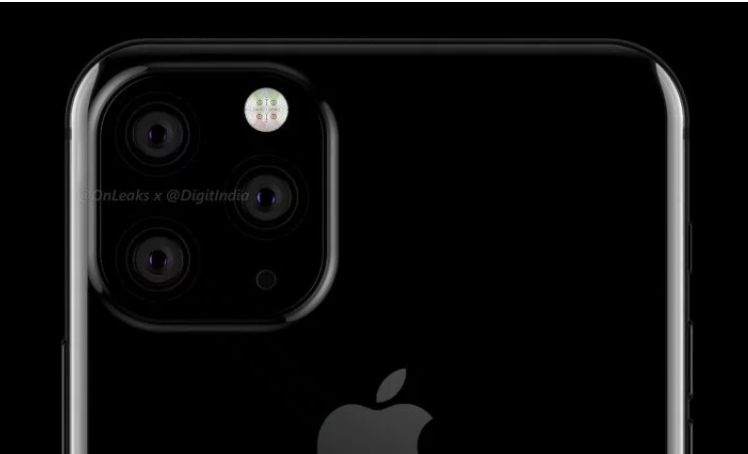
Rumors of Apple adding a third rear camera to the iPhone have been floating around for at least the past two release cycles, but now that Samsung has embraced the feature, it’s hard to imagine Apple waiting much longer to join in on the trend. Considering how early and how often the iPhone XS leaked in 2018, we probably won’t have to wait until September to find out, either, unless Apple clamps down on the leaks this year.
In addition to corroborating previous reports about the triple-camera setup, Macotakara also says that all three iPhone models this year will be identical in size to the iPhone XS, XS Max, and XR. This seems to mirror a report from the fall from analyst Ming-Chi Kuo, who referred to the three 2019 iPhone models as the New 6.5-inch OLED, New 5.8-inch OLED, and New 6.1-inch LCD. Macotakara also claims that accessories (such as cases) for the new phones are already in development, and that they have “large holes in the back” to accommodate the cameras.
Source: bgr










