
NEWS

Apple News Subscription Service Preview Found in iOS 12.2 Beta

01/26/2019

3501

A preview of an Apple News subscription service was found in a developer build of iOS 12.2, and the service would offer access to newspapers and magazines for a monthly fee. The images line up with The New York Times report from last October that reported Apple is close to launching its own subscription service inside the News app, and it builds on Apple’s acquisition of a digital magazine subscription service called Texture, which was billed as the “Netflix of magazines,” earlier last year.
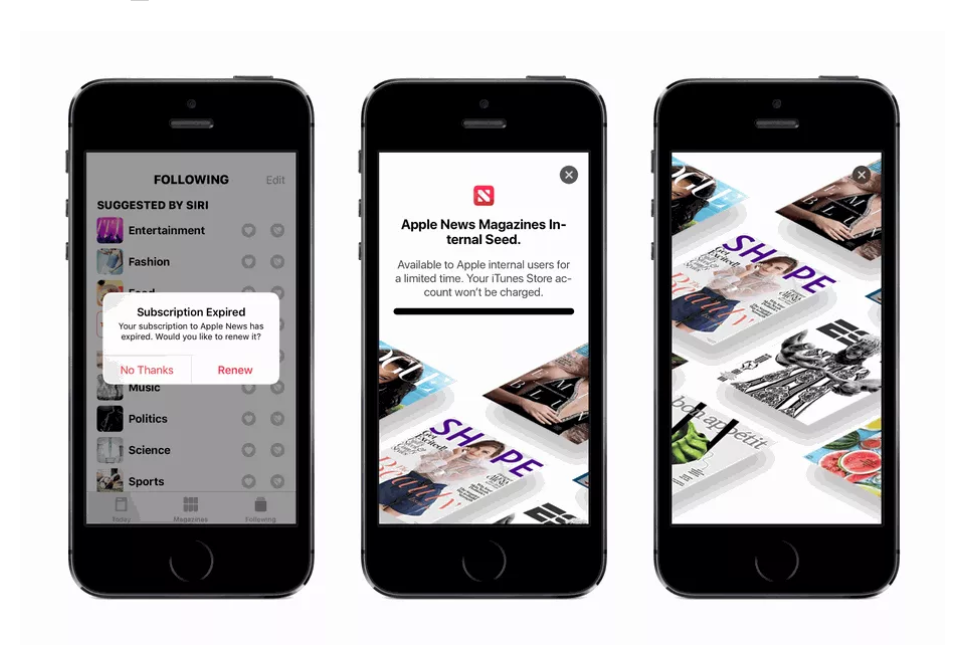
Apple News Subscription Service Preview Found in iOS 12.2 Beta

The splash page shows that the subscription service might be called “Apple News Magazines,” and payment will be handled through the iTunes store. There’s no pricing information or any sort of expected launch date yet, but for reference, Texture’s service offered a $9.99-per-month subscription to 200 magazines from major publishers, including The New Yorker and Time.


Apple has also been rumored to be working on an all-in-one subscription service that bundles its news and magazine service with its original video content as well as Apple Music, per a report from The Information. Mentions of “bundle subscriptions” have been found in the beta app, which suggests that the streaming bundle isn’t too far away.


Source: theverge

Windows
Mac OS
iOS
Linux
3uTools
Win 64-bit For this device
V9.0 2025-11-11
Download
Win 32-bit For this device
V9.0 2025-11-11
Download
3uTools
Intel Chip How to Identify Chip Type
V9.0 2025-12-02
Download
Apple Silicon
V9.0 2025-12-02
Download
How to Identify Chip Type
1.  Click the Apple icon in the top-left corner of the screen and select About This Mac.
2.  Check the Processor or Chip field to determine if it is "Intel" or "Apple".
Please use the 3uTools PC client to install the iOS client:
1、 Install either the Windows or Mac version of 3uTools on your computer
2、 Open the PC client and connect your device to the computer via USB cable
3、 After the connection is successful, wait for the computer to automatically install the mobile app for the device, or locate “Install Mobile App” on the computer and manually click to install.
3uTools
deb file
V3.01 2025-11-20
Download
rpm file
V3.01 2025-11-20
Download
Windows
Windows
iOS
iOS
Android
Android
TV
TV
3uAirPlayer
Win 64-bit For this device
V6.0.2 2025-11-19
Download
Win 32-bit For this device
V6.0.2 2025-11-19
Download
iOS Device Mirroring (No App Required)
1、 Install 3uAirPlayer on the Windows PC
2、 Open Control Center and select Screen Mirroring
3、 From the list, choose your PC to start mirroring
4、 Or connect your iOS device to the PC via USB to begin mirroring
Scan to get "3uAirPlayer" App
3uAirPlayer TV V1.0.18
2025-11-28
TV System Requirements: Android 7.0 or later
Download the TV installation package, copy it to a USB drive, insert it into your TV or set-top box, then select the file from the home screen to install.




