
NEWS

iPhone SE Goes Back on Sale as a $249 Clearance Item

01/21/2019

2828

Do you deeply regret passing on the iPhone SE before Apple cut it out of the lineup? You now have another chance to get it. Apple has quietly resumed selling the iPhone SE as a clearance item in the US, starting at $249 for a 32GB model (down from the original $349) and $299 for a 128GB version (a sharp drop from the initial $449). These aren't used models, either -- they're shiny new, or at least as shiny new as you can get for a phone that went mostly unchanged since its 2016 debut.
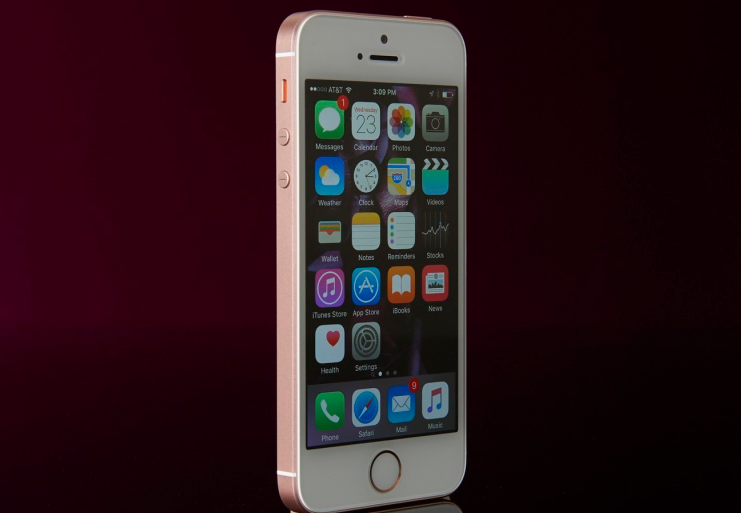

iPhone SE Goes Back on Sale as a $249 Clearance Item


As the age implies. You're effectively getting a shrunken iPhone 6s, including the A9 processor and 12-megapixel rear camera. It can still run the latest version of iOS, though, and that price could make it worthwhile if you're determined to replace a dying phone or want a just-in-case backup device.


It's not certain why Apple is only now bringing the iPhone SE back for clearance sales. It won't mind selling more iPhones, though. The company recently warned that it will miss holiday season financial estimates after iPhone sales in China and other areas fell short of expectations, and this could help shore up numbers (albeit in a modest way) as 2019 gets started.


Source: engadget

Windows
Mac OS
iOS
Linux
3uTools
Win 64-bit For this device
V9.01 2025-12-27
Download
Win 32-bit For this device
V9.01 2025-12-27
Download
3uTools
Intel Chip How to Identify Chip Type
V9.01 2025-12-31
Download
Apple Silicon
V9.01 2025-12-31
Download
How to Identify Chip Type
1.  Click the Apple icon in the top-left corner of the screen and select About This Mac.
2.  Check the Processor or Chip field to determine if it is "Intel" or "Apple".
Please use the 3uTools PC client to install the iOS client:
1、 Install either the Windows or Mac version of 3uTools on your computer
2、 Open the PC client and connect your device to the computer via USB cable
3、 After the connection is successful, wait for the computer to automatically install the mobile app for the device, or locate “Install Mobile App” on the computer and manually click to install.
3uTools
deb file
V3.01 2025-11-20
Download
rpm file
V3.01 2025-11-20
Download
Windows
Windows
iOS
iOS
Android
Android
TV
TV
3uAirPlayer
Win 64-bit For this device
V6.0.2 2025-11-19
Download
Win 32-bit For this device
V6.0.2 2025-11-19
Download
iOS Device Mirroring (No App Required)
1、 Install 3uAirPlayer on the Windows PC
2、 Open Control Center and select Screen Mirroring
3、 From the list, choose your PC to start mirroring
4、 Or connect your iOS device to the PC via USB to begin mirroring
Scan to get "3uAirPlayer" App
3uAirPlayer TV V1.0.18
2025-11-28
TV System Requirements: Android 7.0 or later
Download the TV installation package, copy it to a USB drive, insert it into your TV or set-top box, then select the file from the home screen to install.




