 NEWS
NEWS
iPhone XR Was Top-selling iPhone in November While the Yearly Sales Down 20%
 01/08/2019
 3607
3607
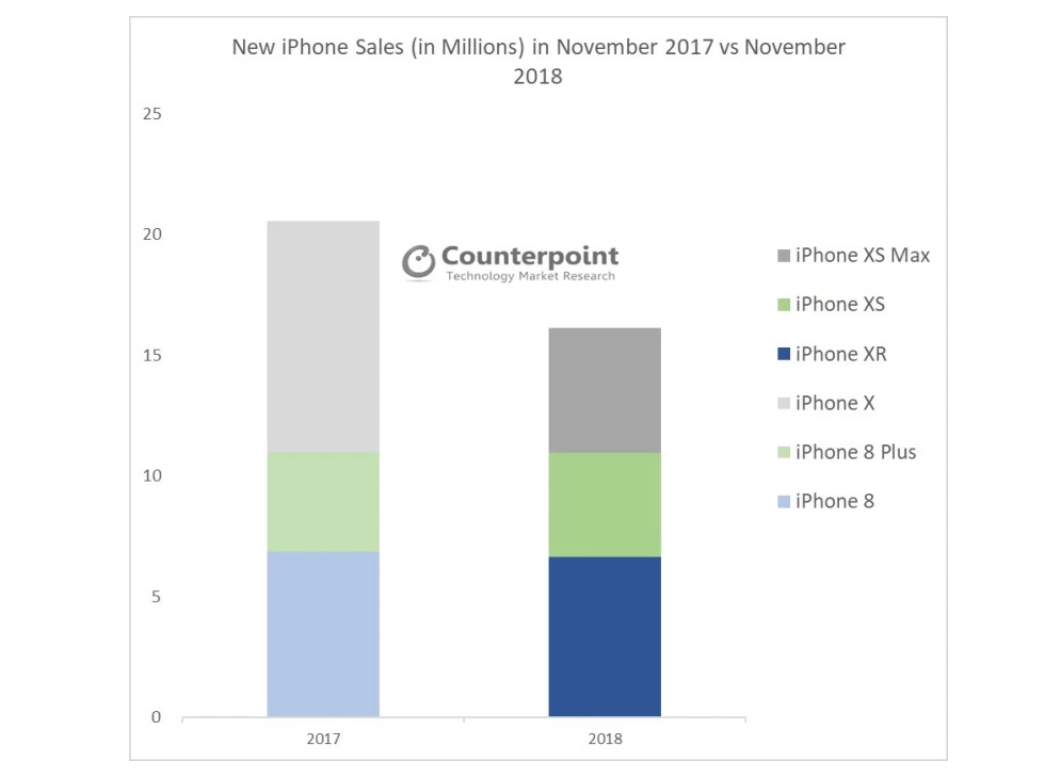
New data from market research firm Counterpoint shows iPhone sales are down 20% YoY based upon November 2018 numbers versus 2017. Further, the firm shows that last November, the $999+ iPhone X was the best selling phone in November, while this year it is the iPhone XR, which starts at $749.
Counterpoint says that the iPhone X experienced “almost 50 percent higher volume” in November 2017 than the iPhone XR did in 2018.
Unsurprisingly, lower than expected sales in emerging markets such as India and greater China have continually contributed to decreasing sales globally. Counterpoint also says that in comparison to iPhone 8, sales of iPhone XR were down 5 percent in November.
The article goes on to detail more key study findings, remarking:
The iPhone XR series outsold XS and XS Max series, iPhone XR 64 GB became the best-selling iPhone during the month.
Similarly, iPhone XS, when compared to iPhone 8 Plus, was up 3% YoY. iPhone XS Max, when compared to iPhone X during the same month last year, shows a 46% decline in sales. However, cumulative sales of iPhone XS Max were 50% higher till November than that of iPhone X last year due to the early availability of the higher priced models this year.
We are also expecting an increase in sales of older iPhone models like iPhone 8 and iPhone 7 in emerging markets due to the high price of newer models.
A chart visualizing iPhone sales can be seen below.
Earlier today, Trump Commerce Secretary Wilbur Ross spoke with CNBC, and said Apple shouldn’t point towards China for struggling iPhone sales, considering no specific tariffs have been imposed. That goes despite Apple CEO Tim Cook assuring China sales are “100%” to blame.
Source: 9to5mac









