 NEWS
NEWS
Steve Jobs Wanted Ultra-optimized US Manufacturing, Apple Vets Say
 12/18/2018
 3151
3151
Former Apple CEO Steve Jobs was, for a time, deadset on U.S.-based manufacturing of computers, an effort which collapsed after just eight years.
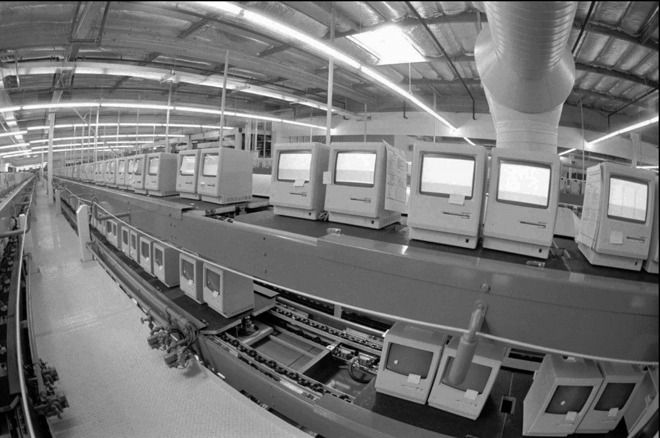
Jobs had "deep convictions" about Japanese-style manufacturing, according to Randy Battat, who told the New York Times about his time as an electrical engineer at Apple and helping to launch early laptops. The company established U.S.-based Macintosh manufacturing in the early 1980s, beginning with a heavily automated factory in Fremont, Calif.
"The Japanese were heralded as wizards of manufacturing," Battat explained. "The idea was to create a factory with just-in-time delivery of zero-defect parts. It wasn't great for business."
In fact, the result was "really shameful" and slipshod, said Jean-Louis Gassee, a French office automation specialist who became president of Apple's product division in 1988, well after Jobs' departure. He blamed the issue at least in part on overall deficiencies in U.S. infrastructure.
"We don't have a manufacturing culture," Gassee complained, "meaning the substrate, the schooling, the apprentices, the subcontractors."
President Donald Trump and others have urged companies like Apple to bring manufacturing back to the U.S. Decades of corporate offshoring have drained the country of its capabilities in that area, however, and higher labor, safety, and environmental standards would likely increase Apple's expenses and already high pricetags. The company has nevertheless done some U.S. manufacturing in the post-Jobs era, namely building the cylindrical Mac Pro in a factory in Austin.
Source: appleinsider









