
NEWS

FCC Filings Reveal Apple May Be Working on a New Beddit sleep Monitor

12/07/2018

3141

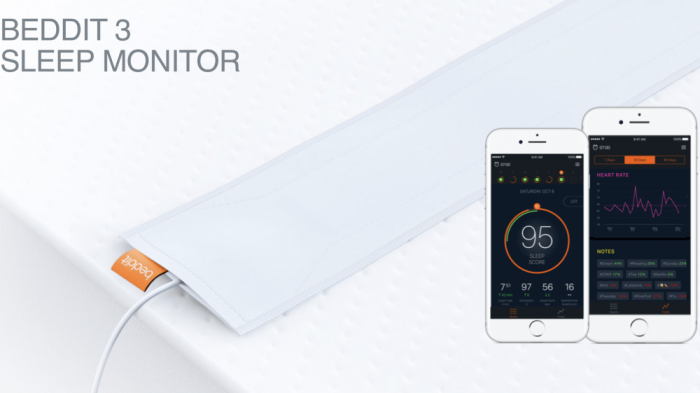
Beddit's sleep tracker. The company was acquired by Apple in May of 2017.

 FCC Filings Reveal Apple May Be Working on a New Beddit sleep Monitor


Apple might build a sleep tracking device.


Apple on Wednesday received approval from the Federal Communication Commission for a "sleep monitor" in the US. Details in the filing are slim, but an illustration of the product label includes the description "designed by Beddit in California."


Apple acquired Beddit in May 2017. The company makes a $150 sleep tracking device that lies between your sheet and mattress to monitor your vitals as you snooze. In 2015, it launched a cheaper sleep tracker that costs $119.


Both devices have a small pressure sensor that measures and monitors your total sleep time, resting heart rate, respiration rate, how long it took you to fall asleep, how many times you got up and the amount of deep sleep you got.


The illustration in the FCC filing Wednesday appears similar to Beddit's previous sleep trackers.


Apple and other wearable device makers have been working to bulk up the health and wellness features in its devices. The Apple Watch Series 4 has fall detection and can measure electrocardiogram (EKG or ECG), though it requires third-party apps for sleep tracking.


Apple didn't immediately respond to a request for comment. 


Source: cnet

Windows
Mac OS
iOS
Linux
3uTools
Win 64-bit For this device
V9.0 2025-11-11
Download
Win 32-bit For this device
V9.0 2025-11-11
Download
3uTools
Intel Chip How to Identify Chip Type
V9.0 2025-12-02
Download
Apple Silicon
V9.0 2025-12-02
Download
How to Identify Chip Type
1.  Click the Apple icon in the top-left corner of the screen and select About This Mac.
2.  Check the Processor or Chip field to determine if it is "Intel" or "Apple".
Please use the 3uTools PC client to install the iOS client:
1、 Install either the Windows or Mac version of 3uTools on your computer
2、 Open the PC client and connect your device to the computer via USB cable
3、 After the connection is successful, wait for the computer to automatically install the mobile app for the device, or locate “Install Mobile App” on the computer and manually click to install.
3uTools
deb file
V3.01 2025-11-20
Download
rpm file
V3.01 2025-11-20
Download
Windows
Windows
iOS
iOS
Android
Android
TV
TV
3uAirPlayer
Win 64-bit For this device
V6.0.2 2025-11-19
Download
Win 32-bit For this device
V6.0.2 2025-11-19
Download
iOS Device Mirroring (No App Required)
1、 Install 3uAirPlayer on the Windows PC
2、 Open Control Center and select Screen Mirroring
3、 From the list, choose your PC to start mirroring
4、 Or connect your iOS device to the PC via USB to begin mirroring
Scan to get "3uAirPlayer" App
3uAirPlayer TV V1.0.18
2025-11-28
TV System Requirements: Android 7.0 or later
Download the TV installation package, copy it to a USB drive, insert it into your TV or set-top box, then select the file from the home screen to install.




