 NEWS
NEWS
Class Action Suit Accuses Apple of Selling Macs Without Needed Dust Filters
 11/29/2018
 3948
3948
A new class action lawsuit charges that Apple is selling iMacs and MacBooks without air filters, knowing it can lead to dust damage with processors and displays.
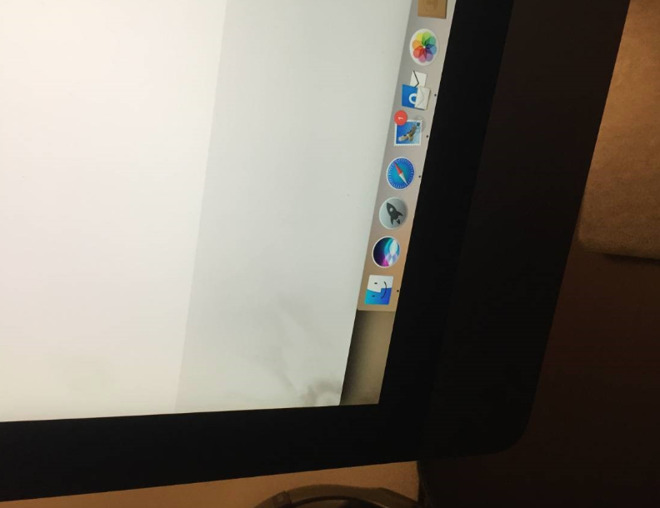
The company has simply "failed to install filters for the computers' vents," according to lawfirm Hagens Berman Sobol Shapiro, representing plaintiffs Kim Ahern, Nikolas Frenzel, and Justin Evans. The firm is actively recruiting more plaintiffs, specifically anyone with a dust-crippled iMac or MacBook made since 2013.
Affected computers may have "dark smudges or spots" on the inside of their displays, and/or slowdowns and crashes caused by dust accumulating on the logic board. The suit charges that people have had to pay for expensive repairs as a result, spending as much as $650 for non-warranty screen replacements when the fix might be as simple as removing the screen and wiping with a rag.
Ahern, who bought a 27-inch iMac, is said to have encountered screen smudges after just nine months, and learned through Google that many other people were dealing with the same problem. Apple's support staff were purportedly unable to help, further denying knowledge of any widespread issue.
"Apple's own message boards are full of reports of these widespread problems caused by the filter defect," said Hagens Berman Sobol Shapiro.
Evans had the screen on his iMac replaced three times, twice at his own expense, and also paid $900 to have his logic board replaced after his computer began to overheat and slow down.
The case is being handled through the U.S. District Court for the Northern District of California in San Jose. The plaintiffs' lawyers are asking for a halt to "Apple's unfair and/or deceptive acts or practices," plus damage payments, including up to $5,000 for class action members who qualify as senior citizens or disabled.
Source: appleinsider










