 NEWS
NEWS
iOS 12 Developer Beta 9 is Now Available
 08/23/2018
 3978
3978
Last week, Apple suffered through the indignity of a messed-up beta launch, but it’s lost no time getting back on the highly metaphorical beta horse. iOS 12 developer beta 9 is now available to download; if you’re already on the beta channel, you probably know how to get the over-the-air update, but if this is your first foray into the world of beta, read on below.
Last Monday, Apple launched iOS 12 developer beta 7, and then pulled it right after since it was rendering some devices unusable. A more stable version, iOS 12 developer beta 8, followed shortly after, and Apple is sticking with the fast update cycle by pushing out iOS 12 developer beta 9 today.
iOS 12 developer beta 9 is currently available — as the name would suggest — to developers. If you don't have an Apple developer account, you could download the beta 9 in 3uTools .
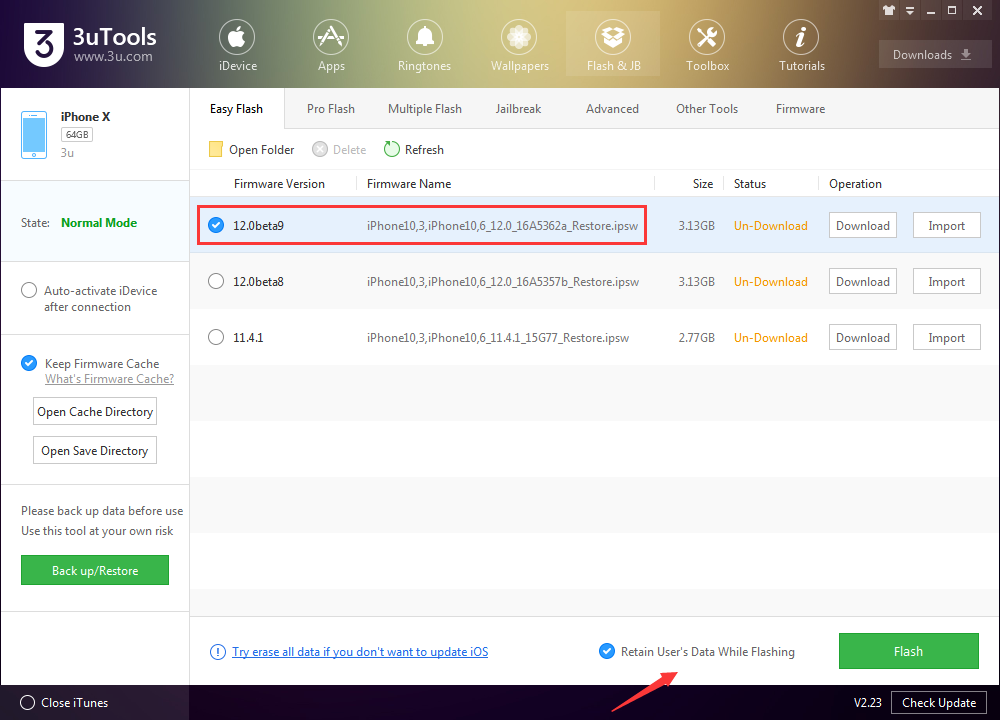
Performance issues are, of course, the name of the game with beta versions of any software, but particularly iOS. Apple specifically warns people on the developer beta channel not to install the software on daily-driver devices — advice that people routinely ignore, of course, but you can’t blame Apple for not warning you!
The slightly safer option, as always, is to stick on the public release version of the iOS betas. Public betas are typically the same as the developer betas, just launched one week later so that any glaring bugs can be nipped in the bud. Notably, Apple spotted the performance updates in last week’s beta before the launch of the public beta and was able to fix them, so people on the public channel were spared the device-wrecking update.
Apple is making iOS 12 available to every device that can run iOS 11, which means iPhones all the way back to the iPhone 5S. Not sure if that includes you? The full list is below:
iPhone X
iPhone 8
iPhone 8 Plus
iPhone 7
iPhone 7 Plus
iPhone 6s
iPhone 6s Plus
iPhone 6
iPhone 6 Plus
iPhone SE
iPhone 5s
12.9-inch iPad Pro 2nd generation
12.9-inch iPad Pro 1st generation
10.5-inch iPad Pro
9.7-inch iPad Pro
10.5-inch iPad
iPad Air 2
iPad Air
iPad 5th generation
iPad mini 4
iPad mini 3
iPad mini 2
iPod touch 6th generation
Source: bgr










