 NEWS
NEWS
It's Time to Make FaceTime Open Source
 06/08/2018
 3893
3893
Apple's FaceTime will soon support 32 people at once. But what's the point of holding video calls with FaceTime, if people who don't own Apple products can't join them?
Steve Jobs himself promised FaceTime would be an open standard when he introduced it on June 7, 2010, almost exactly eight years ago.
There's video proof. You can watch Steve Jobs say it right here, around 1 hour and 36 minutes into his WWDC 2010 keynote address.
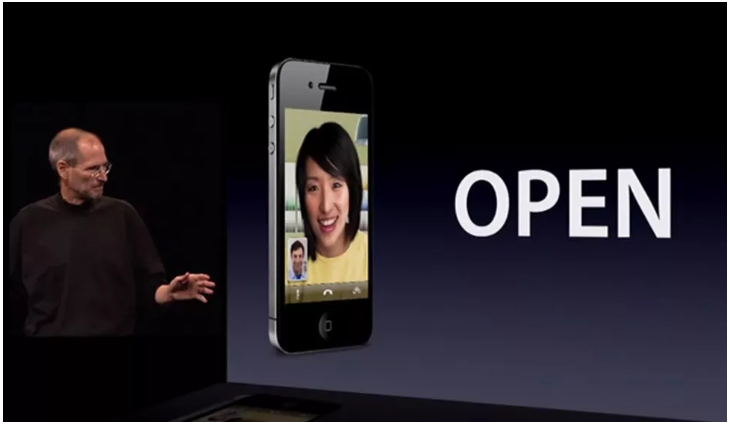
Here's the full quote:
"Now, FaceTime is based on a lot of open standards -- H.264 video, AAC audio, and a bunch of alphabet soup acronyms -- and we're going to take it all the way. We're going to the standards bodies starting tomorrow, and we're going to make FaceTime an open industry standard."
But it didn't happen. And since there are good reasons for Apple to keep it that way, it probably never will.
Like iMessage, FaceTime is one of those services you miss when you switch away from Apple products, making it a great reason to keep buying them. (You might have heard the phrase "lock-in" thrown around from time to time.)
There's also an ongoing lawsuit to consider -- as Ars Technica documented in 2013, Apple was forced to majorly change how FaceTime works to avoid infringing on the patents of a company called VirnetX. Instead of letting phones communicate directly with each other, Apple added "relay servers" to help the phones connect.
Presumably, someone would have to pay for those servers, and/or figure out a way for them to talk to Google or Microsoft or other third-party servers if FaceTime were going to be truly open.
But that doesn't make a broken promise less frustrating. Particularly now that Apple could potentially fix annoying business video calls as well. A Skype-killing video chat service that worked on Mac, iOS *and* Windows, Android and the open web? That's something I bet companies would be happy to pay for, too.
Apple didn't respond to a request for comment.
Source: cnet










