 NEWS
NEWS
Even Genuine Replacement Apple Displays can Mess with iPhones
 04/12/2018
 5176
5176
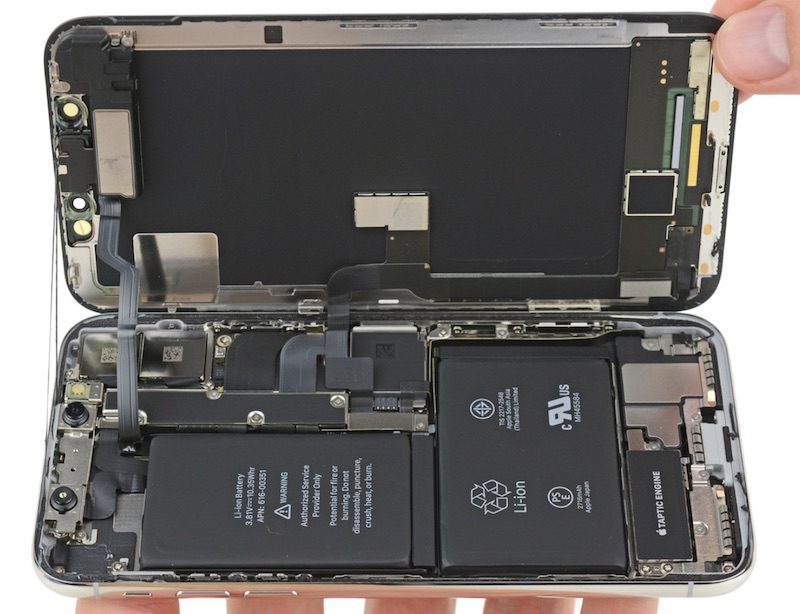
Following the news that the latest iOS update can break phones with non-official replacement screens, repairers are encountering a different, more subtle problem: If you put a genuine Apple replacement display into an iPhone 8, 8 Plus or X, it'll no longer be able to adjust its brightness automatically. If Apple or one of its authorized partners were to put the same display in the same phone, though? No problem.
The aftermarket repair community has verified the behavior in phones from the US all the way to Australia. It's confirmed to be an issue with phones running iOS 11.1, 11.2 and 11.3, which led sources to suggest it's been a problem since the launch of the latest batch of iPhones last fall. I was able to confirm that even swapping the displays of two brand-new iPhones causes the ambient light sensor to stop working, despite it not being altered or touched in any way. Experiments have shown that the sensor is disabled by iOS during the boot process.
There's some debate over whether this is a bug or a feature. Apple first tied hardware and software together with the launch of Touch ID on the iPhone 5S. Third-party repairers quickly found out that replacing a broken fingerprint sensor with a working unit would disable Touch ID. This was the root cause of the infamous "Error 53," which broke phones without a valid fingerprint sensor on restore. Apple said the security test that caused Error 53 was only supposed to be performed at the assembly factory, and fixed the bug by disabling the test during the restore process.
Apple's reasoning for locking down the fingerprint sensor in this way was security, and it used the same rationale with the iPhone X and the introduction of the Face ID camera array. Some of the repairers we spoke with, who asked to remain anonymous for fear of repercussions, don't believe this is the case. Instead, they think it represented Apple's first tentative steps towards controlling the entire repair process.
When Apple replaces a Touch ID or Face ID sensor, it uses a machine dubbed Horizon, which tells the phone all its parts belong with one another. Apple recently started shipping these machines (around 400 last year) to some of the 4,800 authorized service providers around the world. But that leaves a large number of authorized service providers in the dark, as well as aftermarket repair shops, which greatly outnumber those officially approved by Apple. And that's not to mention individuals who feel confident enough to fix their own devices.
But why would merely swapping the displays of two identical, working iPhones disable a seemingly unrelated sensor? "I've been waiting for this for five years to be honest, since the 5S," one repairer said. "It's a scary looking future for me." They expressed concern that Apple is using the ambient light sensor "as a test-case to see how it works, to see if they can link hardware with logic boards so if they were repaired outside of the Apple network it loses functionality."
The same source said that the ambient light sensor issue could "open us to a lot of returns and a world of trouble," but added that they were willing to talk about it in the hope of forcing Apple to address it. After all, it was public outcry that pushed Apple to fix Error 53. They also believe that the recent iOS 11.3 problem is an attempt by Apple to damage public trust in aftermarket repairs.
Considering that screen cracks and smashes are among the most common types of damage seen by repairers, it's likely that tens of thousands of phones are currently affected. One source, on discovering the behavior, was shaken. They said that they had personally replaced over 100 displays. "We try to offer a cheap alternative [to Apple], and we only use genuine parts. I'm worried that customers are going to come back to me and demand that I fix it. What can I do if Apple is the one disabling the sensor?" Another source said that they repaired between 20 and 50 iPhone 8 screens per month.
The "right to repair" is a hot issue. Just yesterday, the FTC warned companies about preventing third-parties from repairing products. Separately, several states (most recently California) are seeking to introduce legislation that would coerce companies into making customer repairs easier. Historically, Apple has been against right to repair bills, telling lawmakers in Nebraska that a proposed law would turn the state into a "Mecca" for hackers.
Locking down Touch ID and Face ID was easy for Apple to explain. Likewise, disabling untested third-party components can be presented as a quality control measure. But it's tough to see why the company would need to lock customers and aftermarket repairers out from replacing parts like-for-like. I spoke with Apple about the problem, but after initially replying to ask some follow-up questions, the spokesperson failed to provide a response in time for publication.
Source: engadget










