 NEWS
NEWS
Friends Discover They Can BOTH Unlock the Same iPhone X Using Face ID
 02/09/2018
 3772
3772
Two friends have beat million-to-one odds to crack the facial recognition on the iPhone X - after discovering it accepted both their faces.
Joe Clayton, 23, was shocked when best pal Brad Butcher, 22, unlocked Apple's most expensive phone just by looking at it.
The construction site manager had set up the gadget so only his face appearing in front of the camera would unlock the phone.
But the phone will also give Ben access - and therefore make contactless payments - despite Apple claiming the chances of a mix up are one in a million.
The childhood friends both have dark hair and brown eyes, but have distinctly different shaped faces, noses and mouths.
The discovery casts doubt on the security claims of the phone and Apple's 'million to one' claims.
Joe, from Melksham, Wiltshire, said: "We realised the issue was there in the gym when I crushed the back of my foot doing leg press in the gym.
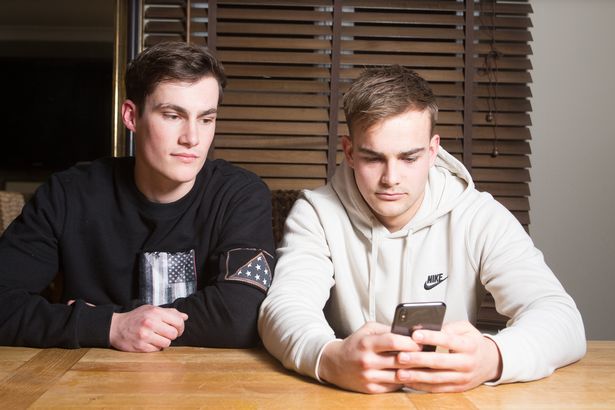
"I passed the phone to Brad to message a friend about what had happened. He looked at the screen and it flashed open. It works every time.
"It's very worrying because a lot of people have this phone and it's a serious fault.
"It's not doing it with anybody else's face - only Brad - but we don't look that much alike.
"In the face we are quite different. We both have thick eyebrows but he definitely has a longer forehead.
"I think people say we're similar because of our jawlines and dark hair but the iPhone is meant to register facial depth which is a different thing altogether."
Brad, who uses an iPhone 7, said the experience has put him off getting another iPhone.
He said: "It seems like the only big difference between my iPhone 7 and Joe's X is the face recognition so I think it's ridiculous you have to pay such a high price for a feature that doesn't work properly.
"I wouldn't get another iPhone at all because it's such a large security feature that's clearly faulty.
Brad described the moment he opened the iPhone as "funny at first" and added: "I thought the phone was already unlocked until Joe said 'You must have unlocked it with your face'.
"After that we laughed and did it again - it's quite scary really that it can be done so easily.
"Me and Joe don't look the same like we used to as kids, particularly in the face because his is much skinnier."
"You'd think that would be enough for the iPhone to recognise it's a different person."
Source: mirror










