
NEWS

Apple's App Store Revenues Poised to Beat Global Box Office in 2018

01/16/2018

3216

Barring a sudden drop in demand, revenues from the App Store are likely to eclipse worldwide box office revenues sometime this year, according to one analyst.
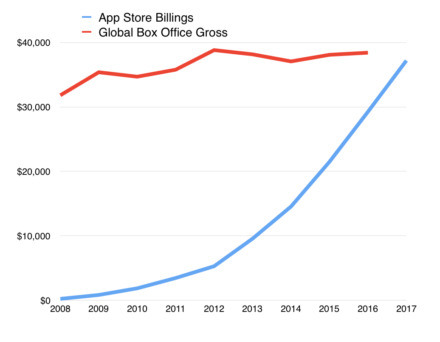

Apple's App Store Revenues Poised to Beat Global Box Office in 2018


Long-term trends show that while global ticket sales are still climbing, the App Store has been growing at a much faster pace since 2012 and was already nearing equality in 2017, Asymco's Horace Dediu said in a recent blog post. Both industries are likely to hit the $40 billion mark in the near future.


The App Store calculation is based on Apple's announcement that it paid developers $26.5 billion last year. Apple typically claims a 30 percent cut from App Store transactions —allowing for the fact that it takes only 15 percent from some subscriptions, real App Store spending is estimated to be about 43 percent higher.


The full economic value of the App Store is much higher still, Dediu noted, since many apps are just front-ends for ad-based services, or ones which otherwise don't split money through the App Store —some examples being Amazon, Airbnb, Facebook, Google, Netflix, and Salesforce. A rough estimate for the economic worth of the App Store in 2017 is $180 billion.


The public's App Store spending has been adding about $5 billion per year since mid-2011, and has helped make apps the biggest portion of Apple's services segment, which at an estimated $57 billion last year is enough to make it a Fortune 100 company on its own.


Source: appleinsider

Windows
Mac OS
iOS
Linux
3uTools
Win 64-bit For this device
V9.0 2025-11-11
Download
Win 32-bit For this device
V9.0 2025-11-11
Download
3uTools
Intel Chip How to Identify Chip Type
V9.0 2025-12-02
Download
Apple Silicon
V9.0 2025-12-02
Download
How to Identify Chip Type
1.  Click the Apple icon in the top-left corner of the screen and select About This Mac.
2.  Check the Processor or Chip field to determine if it is "Intel" or "Apple".
Please use the 3uTools PC client to install the iOS client:
1、 Install either the Windows or Mac version of 3uTools on your computer
2、 Open the PC client and connect your device to the computer via USB cable
3、 After the connection is successful, wait for the computer to automatically install the mobile app for the device, or locate “Install Mobile App” on the computer and manually click to install.
3uTools
deb file
V3.01 2025-11-20
Download
rpm file
V3.01 2025-11-20
Download
Windows
Windows
iOS
iOS
Android
Android
TV
TV
3uAirPlayer
Win 64-bit For this device
V6.0.2 2025-11-19
Download
Win 32-bit For this device
V6.0.2 2025-11-19
Download
iOS Device Mirroring (No App Required)
1、 Install 3uAirPlayer on the Windows PC
2、 Open Control Center and select Screen Mirroring
3、 From the list, choose your PC to start mirroring
4、 Or connect your iOS device to the PC via USB to begin mirroring
Scan to get "3uAirPlayer" App
3uAirPlayer TV V1.0.18
2025-11-28
TV System Requirements: Android 7.0 or later
Download the TV installation package, copy it to a USB drive, insert it into your TV or set-top box, then select the file from the home screen to install.




