
NEWS

iPhone X adoption has overtaken the iPhone 8 and iPhone 8 Plus

12/14/2017

3467

New analytics data suggests the iPhone X is outpacing the iPhone 8 and iPhone 8 Plus in adoption.


Apple hasn't released sales figures for the iPhone X, iPhone 8, or the iPhone 8 Plus, but a new chart shows the most expensive of the three is also the most popular.


Data from analytics firm Mixpanel shows that iPhone X adoption outpaced that of its cheaper cousins in late November. iPhone X adoption currently stands at 4.76%, ahead of the iPhone 8 Plus at 3.59% and the iPhone 8 at 2.78%.


Here's a chart comparing the three new Apple devices:
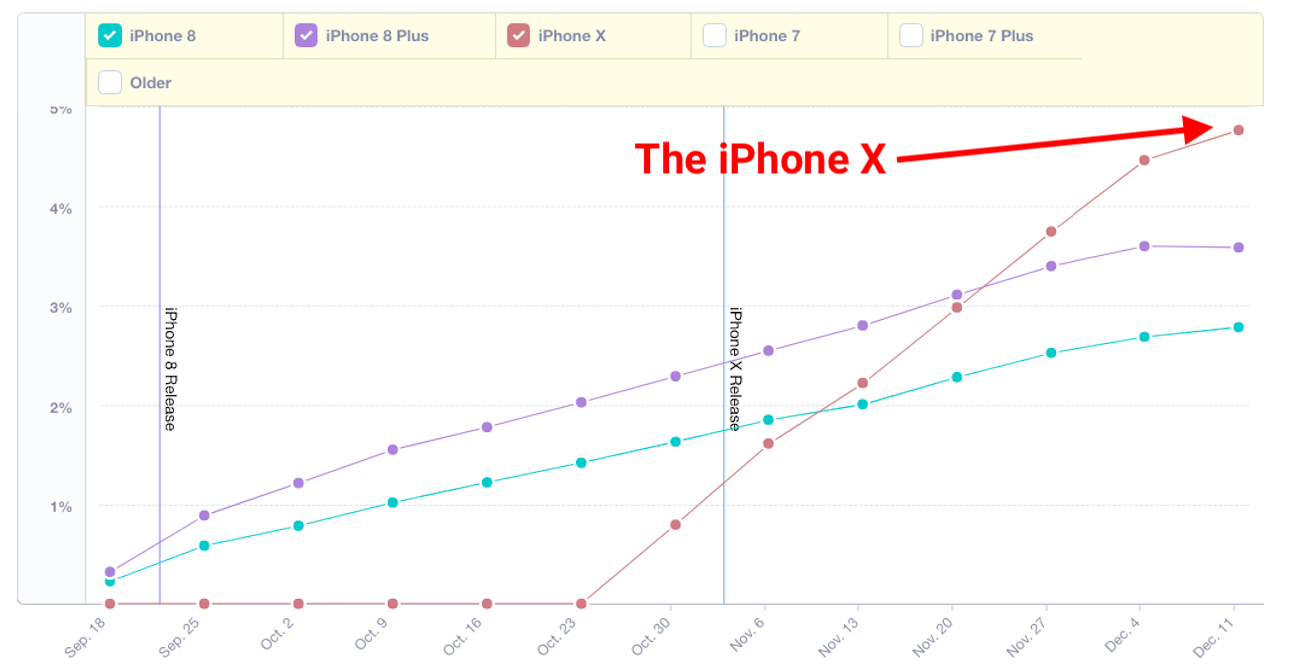

 iPhone X adoption has overtaken the iPhone 8 and iPhone 8 Plus


Mixpanel's data doesn't show sales figures, but measures people picking up the new iPhones and using apps that are integrated with Mixpanel's software development kit.


It's still hard to tell how well the three new devices are selling compared to previous launches. Apple stopped announcing first weekend sales figures with the iPhone 7, because it said the number usually reflected supply rather than customer demand. Apple chief executive Tim Cook ducked iPhone X sales questions during the firm's third quarter call, when analysts asked about pre-orders for the device, saying only that demand was "very strong."


Collectively, it looks like the three devices are selling well and on track to overtake iPhone 7 Plus adoption over the next few months. But early rumours of iPhone X supply constraints may be putting people off buying in these early months, even if Apple is reportedly ramping up production in time for Christmas.


Source: bussinessinsider

Windows
Mac OS
iOS
Linux
3uTools
Win 64-bit For this device
V9.0 2025-11-11
Download
Win 32-bit For this device
V9.0 2025-11-11
Download
3uTools
Intel Chip How to Identify Chip Type
V9.0 2025-12-02
Download
Apple Chip
V9.0 2025-12-02
Download
How to Identify Chip Type
1.  Click the Apple icon in the top-left corner of the screen and select About This Mac.
2.  Check the Processor or Chip field to determine if it is "Intel" or "Apple".
Please use the 3uTools PC client to install the iOS client:
1、 Install either the Windows or Mac version of 3uTools on your computer
2、 Open the PC client and connect your device to the computer via USB cable
3、 After the connection is successful, wait for the computer to automatically install the mobile app for the device, or locate “Install Mobile App” on the computer and manually click to install.
3uTools
deb file
V3.01 2025-11-20
Download
rpm file
V3.01 2025-11-20
Download
Windows
Windows
iOS
iOS
Android
Android
TV
TV
3uAirPlayer
Win 64-bit For this device
V6.0.2 2025-11-19
Download
Win 32-bit For this device
V6.0.2 2025-11-19
Download
iOS Device Mirroring (No App Required)
1、 Install 3uAirPlayer on the Windows PC
2、 Open Control Center and select Screen Mirroring
3、 From the list, choose your PC to start mirroring
4、 Or connect your iOS device to the PC via USB to begin mirroring
Scan to get "3uAirPlayer" App
3uAirPlayer TV V1.0.18
2025-11-28
TV System Requirements: Android 7.0 or later
Download the TV installation package, copy it to a USB drive, insert it into your TV or set-top box, then select the file from the home screen to install.




