 NEWS
NEWS
Ohio State University Fans Troll Apple Over its Infamous Autocorrect Glitch
 11/13/2017
 4396
4396
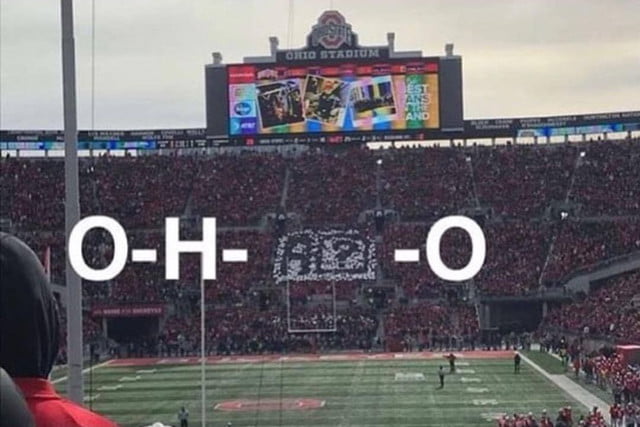
Apple’s latest mobile operating system launched in September, but it included a few annoying hiccups and glitches. One of the most noticeable was in the autocorrect feature, where some users who typed in the letter “i” found it automatically replaced with “A [?]” instead. Apple initially suggested a workaround using the Text Replacement feature, but the bug has now been corrected with the release of version 11.1.1 for iPhone 8 and iPhone X.
That didn’t stop the fans at Ohio State University from poking a little fun at the tech giant, however. Between plays during the recent game pitting the Buckeyes against the Michigan State Spartans, the crowd at the Horseshoe began their familiar “O-H-I-O” chant. The student section in the end zone was ready, holding up cards that spelled out “A [?]” instead.
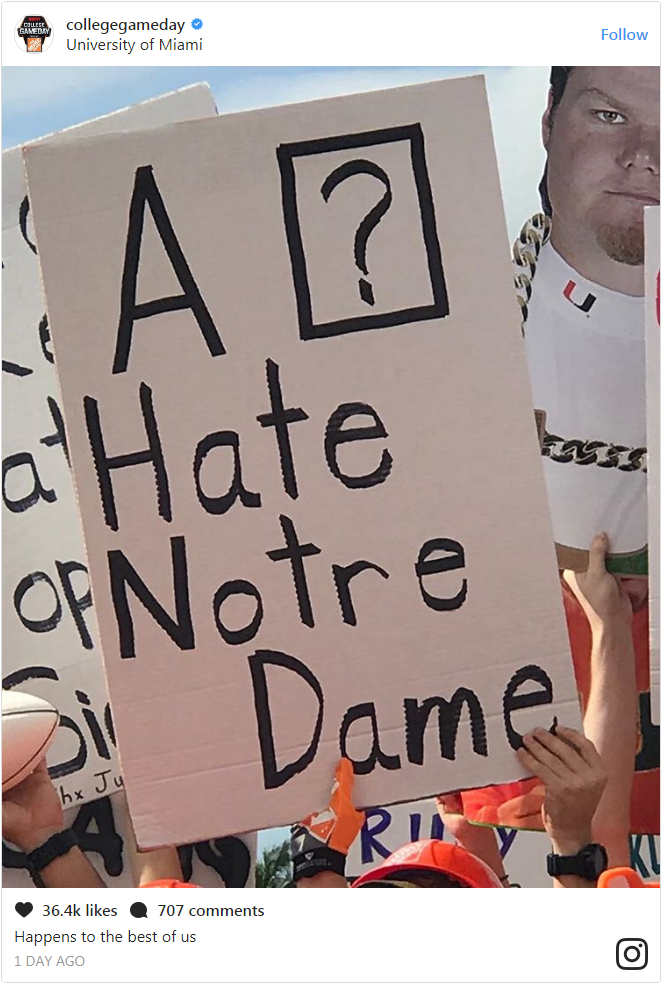
The college football pranks at Apple’s expense didn’t stop with Ohio State. This sign was featured during ESPN’s popular GameDay show in Miami, where students often show up with all manner of signs hoping to be featured on the lengthy pre-game broadcast.
Ohio State University actually has somewhat of a history with Apple, as well as an ongoing future. The school’s iconic marching band was featured in a 2014 commercial for the iPad Air. The band is known for elaboratel halftime shows featuring a wide range of pop culture. Previous halftime performances have featured tributes to Star Wars, James Bond, and The Beatles.
Beginning in 2013, the band began using iPads to choreograph the intricate designsof their marching band routines. Rather than spending $24,000 per year on paper, the band got a grant to supply all band members with the devices.
The OSU-Apple partnership has expanded to include the academic curriculum as well since 2013. Beginning in Fall of 2018, every freshman admitted to the university will be issued a free 10.5-inch, 256GB iPad Pro. The campus will also feature an iOS laboratory where students can learn Apple-specific coding known as “Swift.”
“I see a lot of potential [in the Apple partnership],” assistant professor Theodore Chao told The Lantern. “Swift is so intuitive — a platform that children can use to code, but also doctoral students and adults can use to build out apps.”










